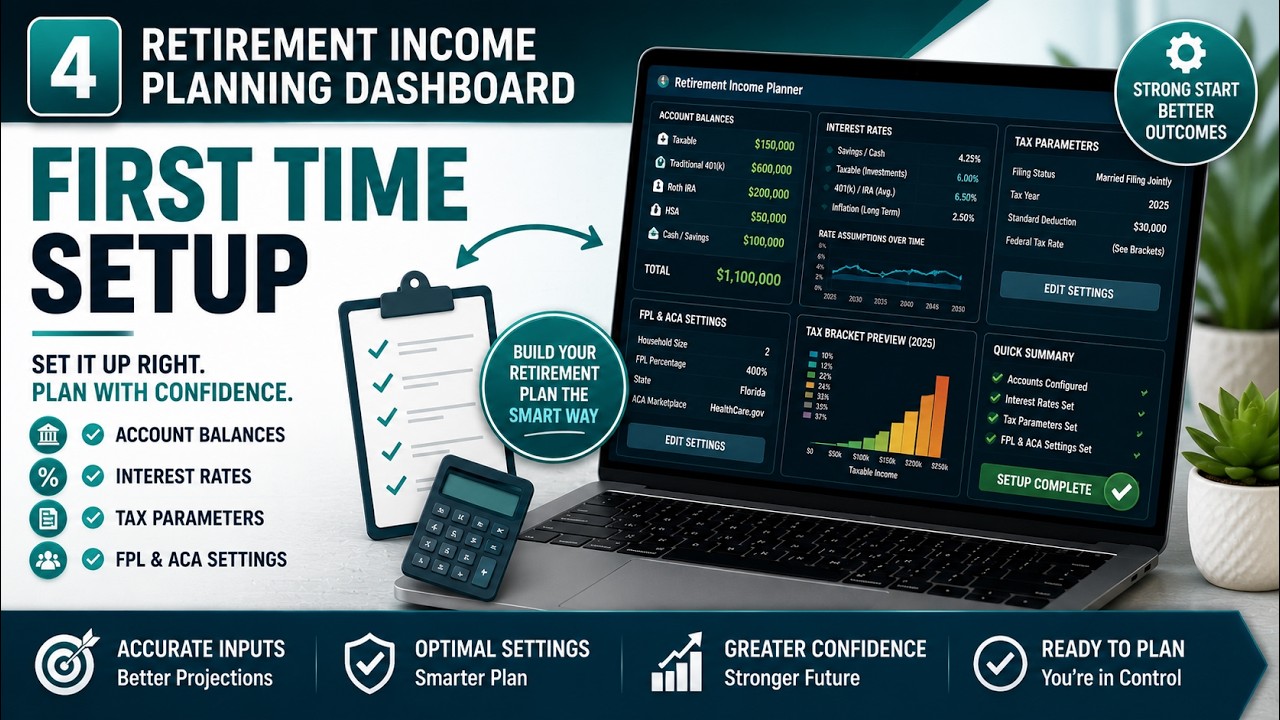
Quick Answer
Setting up a retirement income plan is easier than most people expect once you see the workflow. You are not trying to predict the future perfectly. You are building a month-by-month picture of where your income comes from, what taxes and healthcare take out of it, and what is left in each account as the years pass.

In the AI Retirement Income Planner, the fastest path is a simple two-step rhythm. First you enter your numbers once in the Edit values tab (or let the Quick Setup Wizard walk you through it). Then you move to the Overview tab and fine-tune your withdrawals directly on each phase card, watching the tax, healthcare, and ending-balance figures update instantly until the plan looks healthy across every phase.
The whole thing runs in your browser as a single file. There is no account to create, no subscription, and nothing you enter leaves your machine unless you choose to use an optional online feature. This guide walks through the setup from the first screen to a finished, saved plan.
Key Takeaways
- Work in two steps. Enter everything once in Edit values, then fine-tune on the Overview phase cards. That order is the fastest way to a plan.
- The setup wizard is the quickest start. It collects the essentials in about three minutes, and you can refine everything afterward.
- Watch the ending balance on every card. It is the number that carries each phase into the next. If a later phase runs dry, pull back earlier withdrawals.
- Editing is live. Change a withdrawal and the tax estimate, healthcare cost, and balances all recalculate on the spot, so you can find the right mix without guessing.
- Your data stays local. The plan auto-saves in your browser, and you can export a JSON backup whenever you want.
If the phrase itself is new, what retirement income planning actually is sets out the job this guide is the procedure for.
Start With the Five Phases
The core idea behind the planner is that retirement income is not the same every year. Your costs change, income sources switch on and off, Social Security begins, Medicare replaces private coverage, and required minimum distributions eventually force money out of tax-deferred accounts whether you need it or not.
To model that, the planner divides retirement into a timeline of connected phases rather than treating it as one averaged year. The Overview tab shows these as a row of cards, and this is where you will spend most of your time.
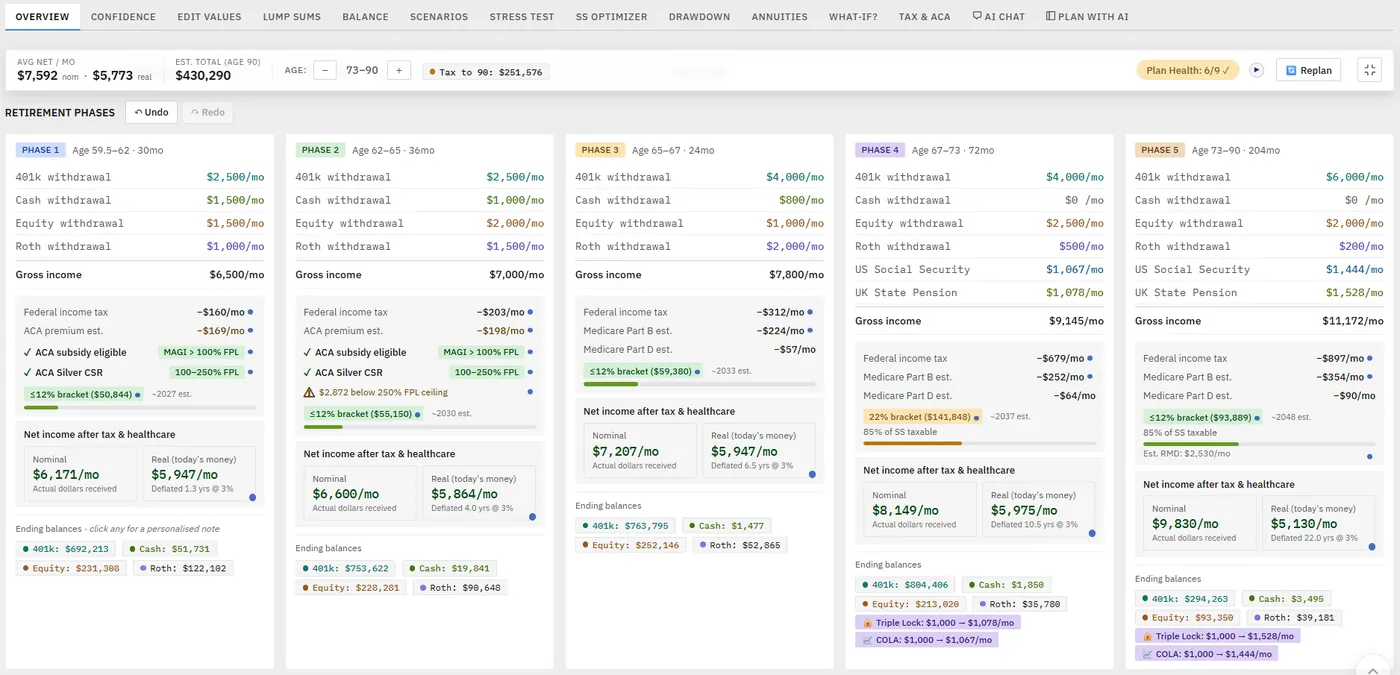
By default the phases are keyed to the milestones that actually change your finances: Phase 1 runs from your retirement age to 62, Phase 2 from 62 (when Social Security first becomes available) to 65, Phase 3 from 65 (when Medicare starts) to 67 (a common full retirement age), Phase 4 from 67 to 73, and Phase 5 from 73 onward (required distributions begin at 73, or at 75 if you were born in 1960 or later), running to age 90 by default; the plan's end can be set anywhere from 80 to 100. If your situation is different, you can change any of those boundary ages and everything else adjusts around it. If you retire before 59.5, the planner adds an earlier phase where you choose how to reach the 401k — leave it untouched and live on cash, brokerage or part-time income, pay the 10% early-withdrawal penalty, or claim the Rule of 55.
Each card shows the net monthly income for that phase, the estimated tax, the healthcare cost, and, most importantly, the ending balance. That ending balance is the number that carries the plan: it is how much is left at the end of a phase and what gets passed to the next one. You want every phase to end healthy. If any phase runs dry, everything after it is in trouble, and the planner makes that obvious.
The Fastest Start: the Quick Setup Wizard
If you are opening the planner for the first time, the Quick Setup Wizard is the quickest way to get a working plan on screen. It collects the essentials in a handful of steps and fills in sensible defaults for everything else, which you can adjust later.
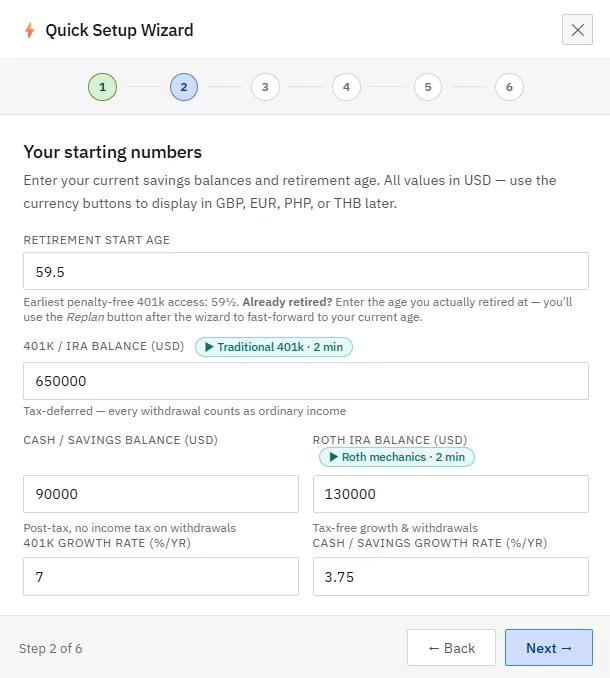
The wizard asks for the basics in plain language:
- Your current age and the age you plan to retire.
- Your starting balances: tax-deferred (401k or IRA), cash, a taxable brokerage account, and a Roth if you have one.
- The growth rates you want to assume for each, plus a general inflation rate.
- Your income sources: an estimated Social Security benefit, any pension, and whether you have rental or part-time income.
- Your filing status (single or married filing jointly) and the age required distributions begin.
You can skip any step and fill it in later. When you finish, the Overview tab is populated and ready to fine-tune. If you would rather the wizard did not appear each time, there is a checkbox to turn it off.
Enter Your Numbers in Edit Values
Whether or not you use the wizard, the Edit values tab is where all your inputs live, organized into sections. Starting from a clean slate, the Reset control gives you a neutral baseline to build on.
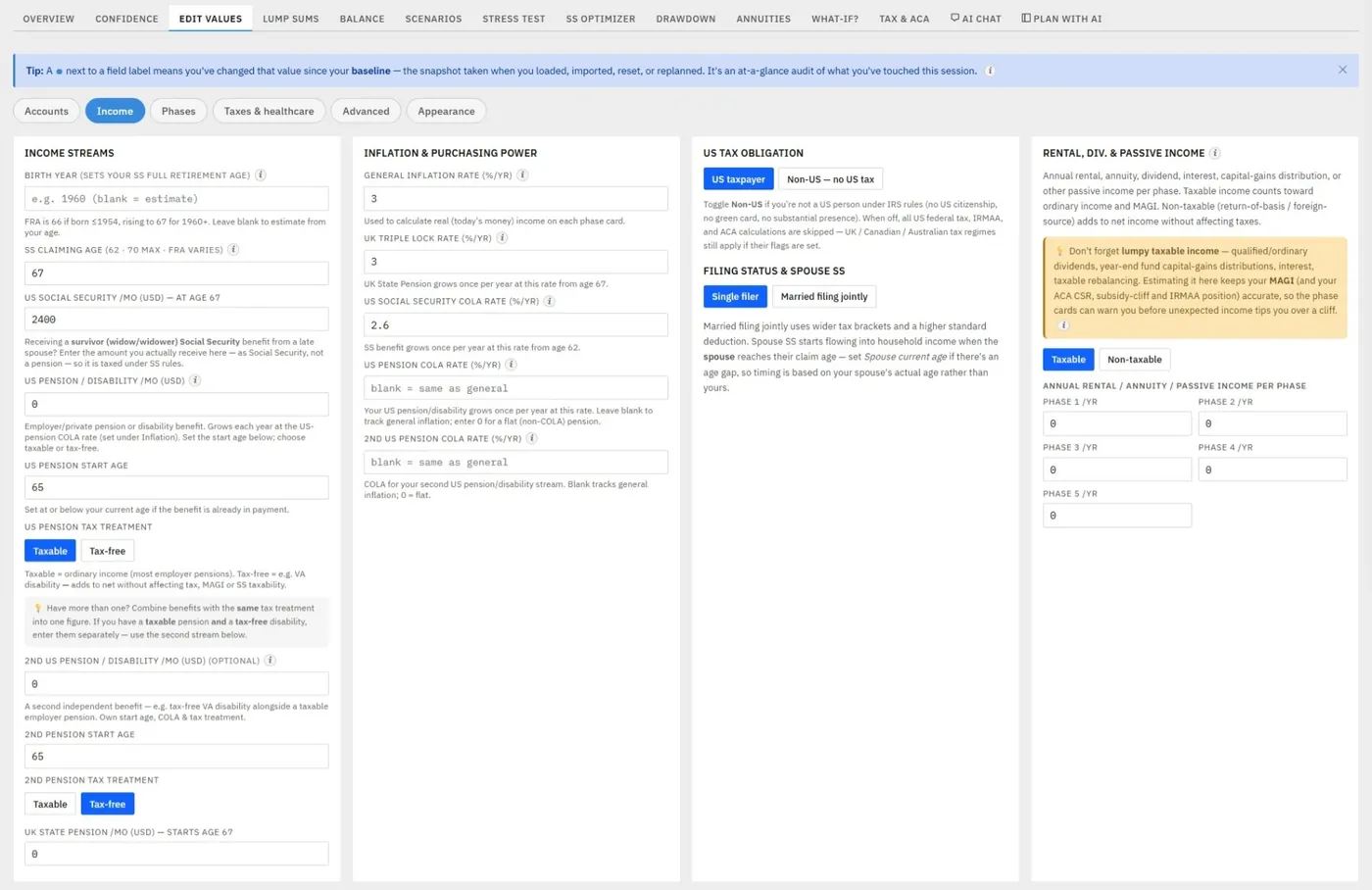
Work through the sections in order:
- Starting balances and growth. Enter your 401k, cash, and brokerage balances, the annual return you expect for each, and, for the brokerage account, roughly what portion of its value is a taxable gain. A high-yield savings rate for cash goes here too.
- Income sources. Enter your Social Security estimate and the annual cost-of-living adjustment you expect. Future amounts are calculated forward automatically, so a benefit entered in today's terms grows across the phases. Pensions, rental or passive income, and part-time work each have their own fields.
- Assumptions. Set your general inflation rate. The planner uses it to inflate tax brackets, deductions, and thresholds forward to each phase, so you do not have to update those by hand.
- Tax parameters. Standard deduction, bracket ceilings, and healthcare thresholds live here. These change every year, so it is worth getting current figures before you rely on the numbers. The planner has a built-in workflow for keeping those rates current that takes a couple of minutes.
Once the sections are populated, return to the Overview tab. From here on, you refine the plan directly on the cards.
Fine-Tune Directly on the Phase Cards
This is the part that makes the planner fast. You do not go to a separate settings page to adjust a withdrawal. You click the number right on the phase card and change it, and the whole card recalculates instantly.
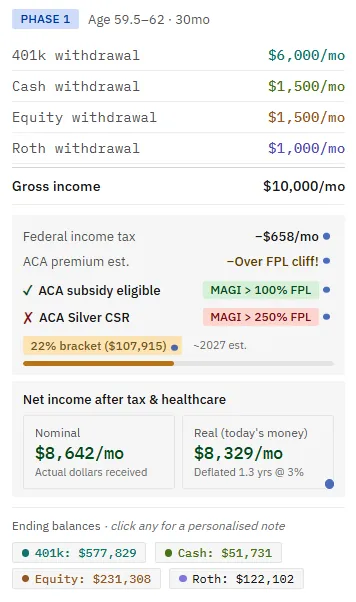
Change how much you pull from your 401k in a phase and watch the ending balance update, the tax estimate move, and the net income figure change, all at once. That live feedback is what lets you find the right withdrawal mix without guessing. A typical rhythm looks like this:
- Decide the monthly income you want in a phase, then adjust which accounts fund it.
- Keep an eye on the ending balance so the phase still hands a healthy amount to the next one.
- Watch the tax bracket and healthcare feedback so a withdrawal does not quietly push you into a higher bracket or over a subsidy threshold.
The planner is constantly checking your income against the thresholds that matter in early retirement. If your income would cost you an ACA subsidy or trigger a Medicare surcharge, it flags it on the card, and the actual cost is built into the numbers so you see what it means in real money. Getting that balance right, drawing from the right account at the right time, is the heart of a good withdrawal plan, and it is covered in more depth in the guides on how much you can spend and reading gross, net, and real income.
If you are unsure which box a particular pension, annuity, or part-time wage belongs in, where to enter each type of retirement income is the field-by-field answer.
A Practical First-Time Flow
If you want a simple order to follow the first time, this is the flow the planner is designed around:
- Get current tax rates so the calculations start from accurate figures.
- Enter your retirement age and starting balances for each account.
- Enter a rough withdrawal amount per phase just to get numbers on the screen.
- Tweak phase by phase on the Overview cards, always checking that each phase ends with the balance you expect.
- Extend to age 90 if you want to test longevity, and rebalance the later phases so nothing runs dry.
- Save the plan when it looks right.
Most people find this genuinely satisfying rather than tedious. Adjusting a cash withdrawal here, a 401k withdrawal there, and watching the ending balances stay healthy turns an abstract worry into something you can see and control. If you would like a gentle, guided version of exactly this, the walkthrough of your first planning session covers the same ground at a slower pace.
Currency and Residency, If You Need Them
For most US users the defaults are all you need. But the planner supports seven currencies (US dollars, British pounds, euros, Canadian and Australian dollars, Philippine pesos, and Thai baht) with residency-aware tax handling for US, UK, Canadian, Australian, and expat scenarios.
All values are stored and calculated in US dollars, and you can then display the plan in another currency using live exchange rates fetched when the file loads, or rates you set yourself for the session. Selecting a non-US currency can also change the tax treatment: UK residence applies UK income tax with foreign tax credit handling, while the foreign-residence mode for someone living in the Philippines, Thailand or the euro area excludes US healthcare costs. This is useful enough that it has its own guide on comparing retiring at home versus abroad.
Replan From Today, Any Time
You do not have to get the plan perfect before you retire and then leave it. If you are already partway through retirement, the Replan from today workflow lets you enter your current age and your actual current balances. The dashboard trims off the phases you have already lived through and recalculates everything from where you actually are now.
This is ideal for an annual course correction. Set up your withdrawal strategy today, then twelve months later come back, replan from your real balances, and adjust. Because retirement rarely follows the projection exactly, this ability to reset to reality is one of the more valuable habits you can build.
Help Is Built In
You do not need to be a financial expert to use the planner, and you are not expected to know every term. A Help section gives step-by-step guidance on each area of the tool, from currencies to withdrawal strategy to the AI features. Alongside it there is a guided feature tour, a concepts primer for first-time users, info popovers next to the trickier fields, and a searchable glossary. Short concept videos explain the ideas that are easiest to misunderstand.
The point is that you can start before you understand everything. You begin so you can understand more, and the explanations are there at the moment you need them rather than buried in a separate manual.
Save, Export, and Come Back
Everything you type auto-saves in your browser as you go, so your work is there when you return. When a plan looks right, you can rename it to describe what it represents, then export it as a JSON file to keep a permanent copy on your own machine. You can hold as many exported plans as you like and reload any of them later.
The planner keeps up to three saved plans in browser slots for quick side-by-side comparison, and the JSON export covers any additional versions you want to keep. That workflow, saving, loading, and comparing scenarios, is worth its own walkthrough. For now, exporting one finished plan is enough to be sure your work is safe.
FAQ
Do I need any financial knowledge to set up a plan?
No. The planner is built to teach as it calculates, with a setup wizard, info popovers, a glossary, a concepts primer, worked examples, and short videos. You start with rough numbers, adjust them, and learn what each input does by watching the results change. The tool is educational and is not a substitute for professional advice.
How long does the initial setup take?
The Quick Setup Wizard collects the essentials in about three minutes and gives you a working plan to refine. Getting a plan you are genuinely happy with usually takes a little longer, because the value is in the fine-tuning, but you can stop and come back at any time since everything auto-saves.
What is the two-step workflow?
Enter all your figures once in the Edit values tab, then move to the Overview tab and fine-tune your withdrawals directly on each phase card. Editing in place recalculates the tax, healthcare, and balance figures instantly, which makes it fast to find the right withdrawal mix. Doing bulk entry first and fine-tuning second is quicker than jumping between the two.
Can I change the ages the phases start at?
Yes. The default boundaries are set to common US milestones, but every boundary age is editable. If your Social Security, pension, or required-distribution timing is different, you change the age and the plan adjusts around it. Retiring before 59.5 adds an earlier phase where you choose how the 401k is reached: untouched, drawn with the 10% penalty priced in, or under the Rule of 55.
Is my financial information kept private?
The planner is a single file that runs in your browser. There is no account, no login, and no connection to your bank or brokerage. Your figures are stored locally and auto-saved, and you can export a JSON backup yourself. The planner is offline-capable for ordinary work once it is open. Optional features such as AI assistance, live exchange rates, and tax-rate lookups do use a connection when you choose to use them.
Source Links
- Social Security Administration, Retirement Benefits: https://www.ssa.gov/benefits/retirement/
- Medicare.gov, When Does Medicare Coverage Start: https://www.medicare.gov/basics/get-started-with-medicare/sign-up/when-does-medicare-coverage-start
- IRS, Required Minimum Distributions FAQs: https://www.irs.gov/retirement-plans/retirement-plan-and-ira-required-minimum-distributions-faqs
- HealthCare.gov, Health Coverage If You Retire Before 65: https://www.healthcare.gov/retirees/
- AI Retirement Income Planner: https://airetirementincomeplanner.com/
Educational Disclaimer
This article is for general education only. It is not financial, tax, investment, legal, healthcare, Social Security, Medicare, estate, or retirement advice. It does not provide personalized recommendations. Projections produced by any planning tool are estimates based on the assumptions entered. Rules, tax law, and costs change. Consult qualified financial, tax, and legal professionals before making significant financial decisions.