
Home › Try the Demo
See it before you buy itTry the interactive demo
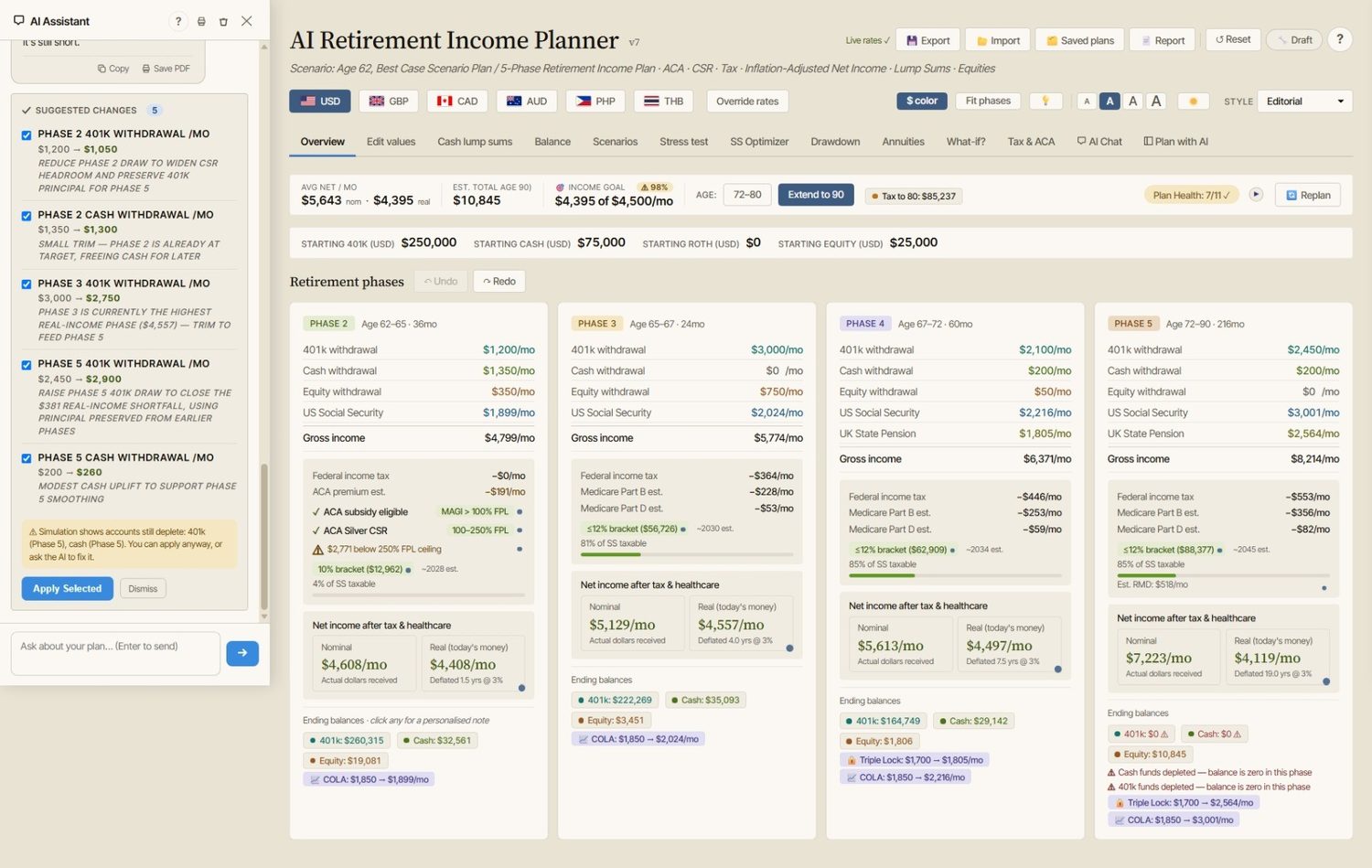
This is the real planner — same tabs, same charts, same analysis tools — pre-loaded with a sample plan so you can click around and get a feel for it. No signup, no download, nothing to install.
Opens in a new tab · runs entirely in your browser · nothing you enter is uploaded
🖥️ The planner and this demo are desktop applications — they work best on larger screens (1920×1080 or higher).
What you’ll be looking at
The demo is loaded with a simple, relatable sample plan: a single filer retiring at 62 with $530,000 saved across a 401k, cash and a brokerage account, claiming $2,200/mo Social Security at 62, plus a $10,000 inheritance arriving in Phase 2. Every number, chart and health check you’ll see is the planner’s genuine output for that plan.
Currencies and residence
Thirteen tabs
Plan Health and sign-off
Phase cards
✅ What works — the real thing
- All 13 tabs — phase cards, balance & income charts, tax detail
- Confidence score with live Monte Carlo & historical backtest
- Stress test grid, Scenarios, SS Optimizer, Drawdown strategies
- What-if explorer — the Social Security claiming slider is fully live
- A scripted AI chat conversation — including one proposal you can actually apply and undo to watch the whole dashboard recalculate
- The 6-step setup wizard — open it from Help and step through the whole onboarding flow (read-only)
- Plan status & sign-off — click the Draft chip, mark the plan under review or sign it off and watch it capture a snapshot (resets on reload)
- Residence switching — flip the same plan between US, UK, Canadian, Australian and expat residence and watch the tax & healthcare treatment change
- Currency display switching, themes, dark mode, text sizing, the full built-in Help
🔒 What’s disabled — it’s a sandbox
- Editing any number — the sample plan is fixed, so the demo stays consistent
- Saving, loading, importing or exporting plans
- The live AI advisor (the demo chat is scripted; the full version connects to a real AI model)
- Replan-from-today and example-plan loading
Anything disabled shows a small note when you click it — you’ll always know what’s demo and what’s product.
An honest note
The demo is a restricted sandbox, not a functional planner — you can’t plan your own retirement in it. It exists so you can judge the interface, depth and clarity for yourself before spending a penny. The full version is this exact app with everything switched on, working with your numbers.
Go on — poke around.
Prefer to watch first? See the video tutorials →
Thinking of retiring overseas? Try our free Retire Abroad comparison →
Not sure whether it fits your situation? Ask the assistant →