Quick Answer
Every year, the numbers underneath your retirement plan quietly change. The IRS adjusts its tax brackets for inflation, new federal poverty levels are published, Medicare IRMAA thresholds shift, and the Social Security cost-of-living rate is announced each autumn. If your plan is built on last year's figures, every calculation is slightly off, and across a twenty-year plan, slightly off adds up.

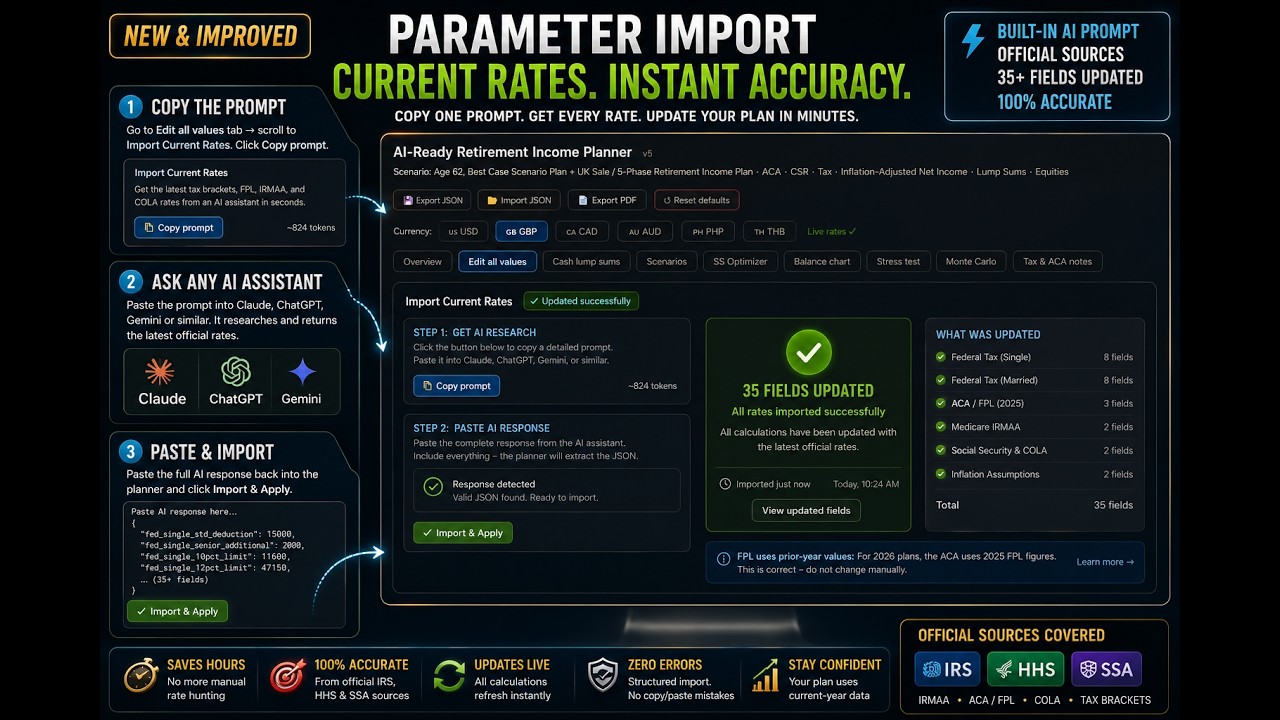
The AI Retirement Income Planner refreshes all of those rate parameters in about two minutes. With an API key connected, one button fetches and applies the current figures. Without a key, you copy a ready-made prompt into any AI assistant and paste the answer back. Either way, it updates only the rate parameters, never your balances, withdrawals, or personal details, so your actual plan is always safe. This guide shows both paths, exactly what gets updated, and when to run it.
Key Takeaways
- Stale rates compound into real error. A plan on last year's brackets and thresholds drifts further off the longer it runs.
- Two ways to refresh, same result. One button with an API key, or copy-and-paste into any AI assistant without one.
- Only rates change. The refresh never touches your account balances, withdrawal amounts, or personal figures.
- The planner inflates the rest for you. You set current-year values once; the planner carries them forward to each phase automatically.
- Run it about once a year. At the start of a new tax year, and after the autumn Social Security COLA announcement.
Why Stale Rates Quietly Break a Plan
A retirement plan depends on dozens of official figures: standard and senior deductions, tax bracket ceilings, the federal poverty levels that decide ACA subsidies, the IRMAA threshold that triggers Medicare surcharges, and the Social Security COLA that grows your benefit. All of them move.
Until you refresh them, your plan is quietly modeling an outdated world. A bracket that was accurate last year now sits in the wrong place; a poverty level that has since risen makes an ACA cliff look closer or further than it really is. None of this is dramatic on its own, but a plan is a chain of these figures compounded across decades, so keeping them current is part of the broader habit of keeping your retirement plan current. The good news is that the planner makes it a two-minute job.
The One-Click Way (With an API Key)
If you have connected an API key, refreshing rates is a single button. At the bottom of the Edit values tab, in the Tax parameters area, is a Fetch current tax rates button.
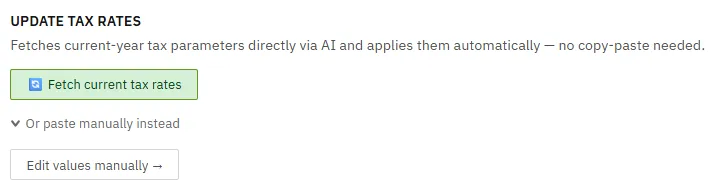
Click it and the AI looks up the current year's published IRS and HHS figures, parses them, applies them, and shows you a before-and-after difference of every value that changed, all in a few seconds for a few cents. It covers US, UK, Canadian, and Australian parameters as relevant to your plan. Connecting a key is covered in the guide on using AI in the planner; once it is set, this is the fastest path and you will rarely use anything else.
The No-Key Way (Copy and Paste)
You do not need an API key. In the same spot at the bottom of the Edit values tab is an Import Current Rates section with a rate research prompt.
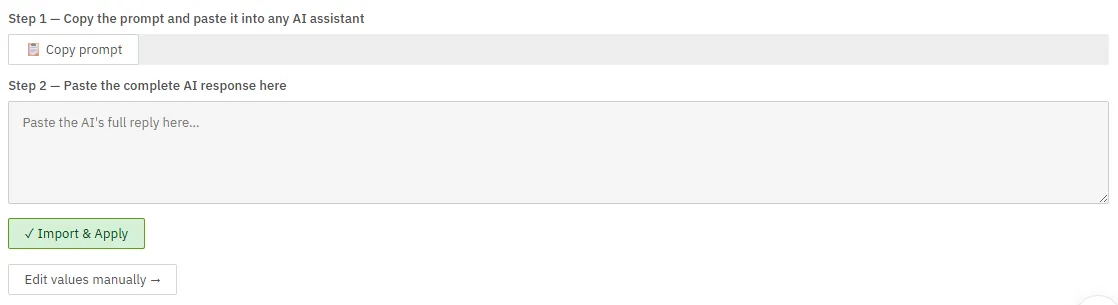
The steps take about two minutes:
- Copy the prompt. Click the copy button in the Import Current Rates section.
- Paste it into any AI assistant. Claude, ChatGPT, and Gemini all work. The AI returns the current figures in a format the planner can read.
- Paste the response back into the box and click Import and apply.
The planner confirms with a message like "35 values imported and applied" (the exact number depends on your version and which parameters apply). The result is identical to the one-click path, just a few extra steps. If the response was malformed, you will see a clear error, in which case paste it again, since some apps introduce hidden characters, or fall back to editing the values by hand.
What Gets Updated (and What Does Not)
The refresh covers more than you might expect. Depending on your currency and filing status, it updates:
- US federal: standard deduction and the senior add-on, the 10%, 12%, and 22% bracket ceilings, the IRMAA threshold, your assumed inflation rate, and the Social Security COLA rate. Married-filing-jointly plans also get the joint deductions, brackets, and IRMAA threshold.
- ACA and poverty levels: the 100%, 250%, and 400% federal poverty level figures that drive ACA subsidies and cost-sharing reductions.
- International: UK personal allowance and rate-band thresholds (entered in US-dollar equivalent, which the AI converts), Canadian personal amount and federal brackets plus an average provincial rate, and Australian thresholds and the Medicare levy.
Just as importantly, here is what the refresh does not touch: your account balances, your withdrawal amounts, and your personal details. It only updates the system-level rate parameters. Your plan data is always safe, so you can refresh with confidence.
The Prior-Year Poverty-Level Detail
One thing surprises people. The ACA marketplace uses the prior year's published federal poverty levels when calculating subsidies for the current plan year. So a 2026 plan correctly uses the 2025 poverty-level figures, not the 2026 ones published in spring.
The prompt tells the AI this explicitly, so when you see the imported poverty-level numbers looking a year behind, that is correct and deliberate. Do not "fix" them to the current year, the planner is matching how the real marketplace works.
When to Run It
You do not need to refresh constantly. The useful moments are:
- The first time you set up a plan, so you start from accurate figures.
- Once a year, typically January or February, once the IRS has published its final bracket adjustments for the year.
- After the autumn COLA announcement, when the Social Security Administration publishes the annual cost-of-living rate (usually October), to keep your benefit growth assumption in line.
- When your plan changes materially, such as extending it from age 80 to 90, or after a replan, so the figures are current before you share or print it.
A Starting Point, Not a Lock
The import is a convenience, not a black box. Everything the AI returns lands in the Tax parameters section of Edit values, fully visible and editable.
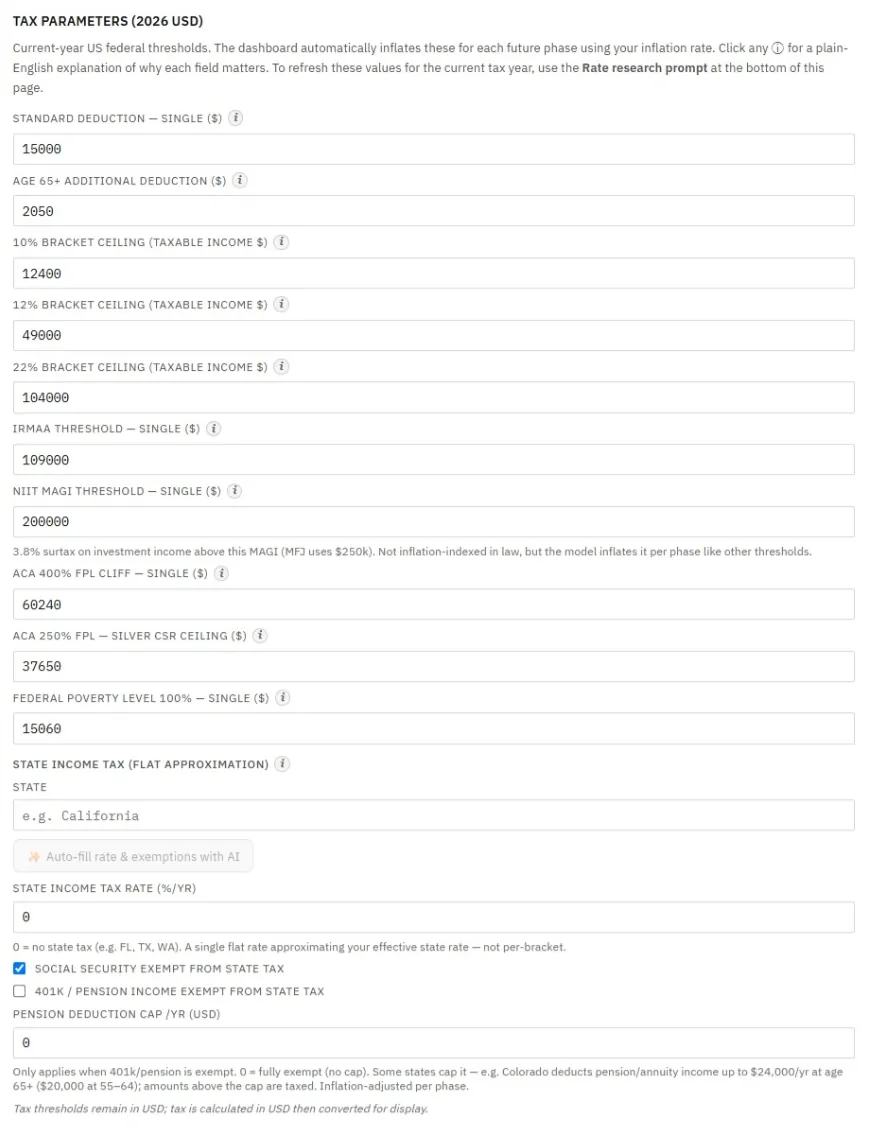
If you know a specific figure for your situation, such as your own state's provincial rate in a Canadian plan, or you want to double-check a value against an official source, you can override anything by hand after importing. And because AI-fetched figures can occasionally be wrong, verifying the key numbers that a decision depends on, against IRS, HHS, or SSA sources, is always worth the minute it takes. The goal is to make annual maintenance feel effortless, so your plan reflects the real tax environment rather than where things stood on the day you first built it.
FAQ
How often should I update the tax rates in my plan?
About once a year is enough for most people: at the start of a new tax year, after the IRS publishes its final bracket adjustments, and again after the autumn Social Security COLA announcement. Also refresh the first time you build a plan and after any major change, such as extending the plan's end age or replanning from a new current age.
Do I need to pay for AI to update my rates?
No. If you have an API key, the one-click Fetch current tax rates button is fastest. Without one, the Import Current Rates section gives you a prompt to copy into any free or paid AI assistant you already use, then paste the response back. Both produce the same result.
Will updating rates change my plan or my balances?
No. The refresh updates only the system-level rate parameters, tax brackets, deductions, poverty levels, IRMAA and COLA figures. It never changes your account balances, withdrawal amounts, or personal details, so your plan is always safe to refresh.
Why do the poverty-level figures look a year old after I import them?
That is intentional and correct. The ACA marketplace uses the prior year's federal poverty levels to calculate subsidies for the current plan year, so a 2026 plan uses 2025 figures. The planner matches this on purpose, so do not change them to the current year.
Can the AI get the numbers wrong?
Yes, AI-fetched figures can occasionally be inaccurate, which is why every imported value is visible and editable in the Tax parameters section. For any number a real decision depends on, it is worth confirming against the official IRS, HHS, or Social Security source before relying on it.
Source Links
- IRS, Inflation Adjustments and Tax Brackets: https://www.irs.gov/newsroom/irs-provides-tax-inflation-adjustments-for-tax-year-2026
- HHS, Federal Poverty Guidelines: https://aspe.hhs.gov/topics/poverty-economic-mobility/poverty-guidelines
- Medicare.gov, Part B Costs and IRMAA: https://www.medicare.gov/basics/costs/medicare-costs
- Social Security Administration, Cost-of-Living Adjustment: https://www.ssa.gov/cola/
- AI Retirement Income Planner: https://airetirementincomeplanner.com/
Educational Disclaimer
This article is for general education only. It is not financial, tax, investment, legal, healthcare, Social Security, Medicare, estate, or retirement advice. It does not provide personalized recommendations. Tax and benefit figures are set by law and change, and AI-fetched values can be incomplete or incorrect. Verify important figures against official sources and consult qualified professionals before making significant financial decisions.