Home  ›  Technical

Under the hood

How the planner is built

For the curious and the careful. A look at the engine, the tax modeling, the privacy architecture and the validation that sit behind every number — plus the full documentation to download.

The engine

Deterministic, month‑by‑month — not a black box

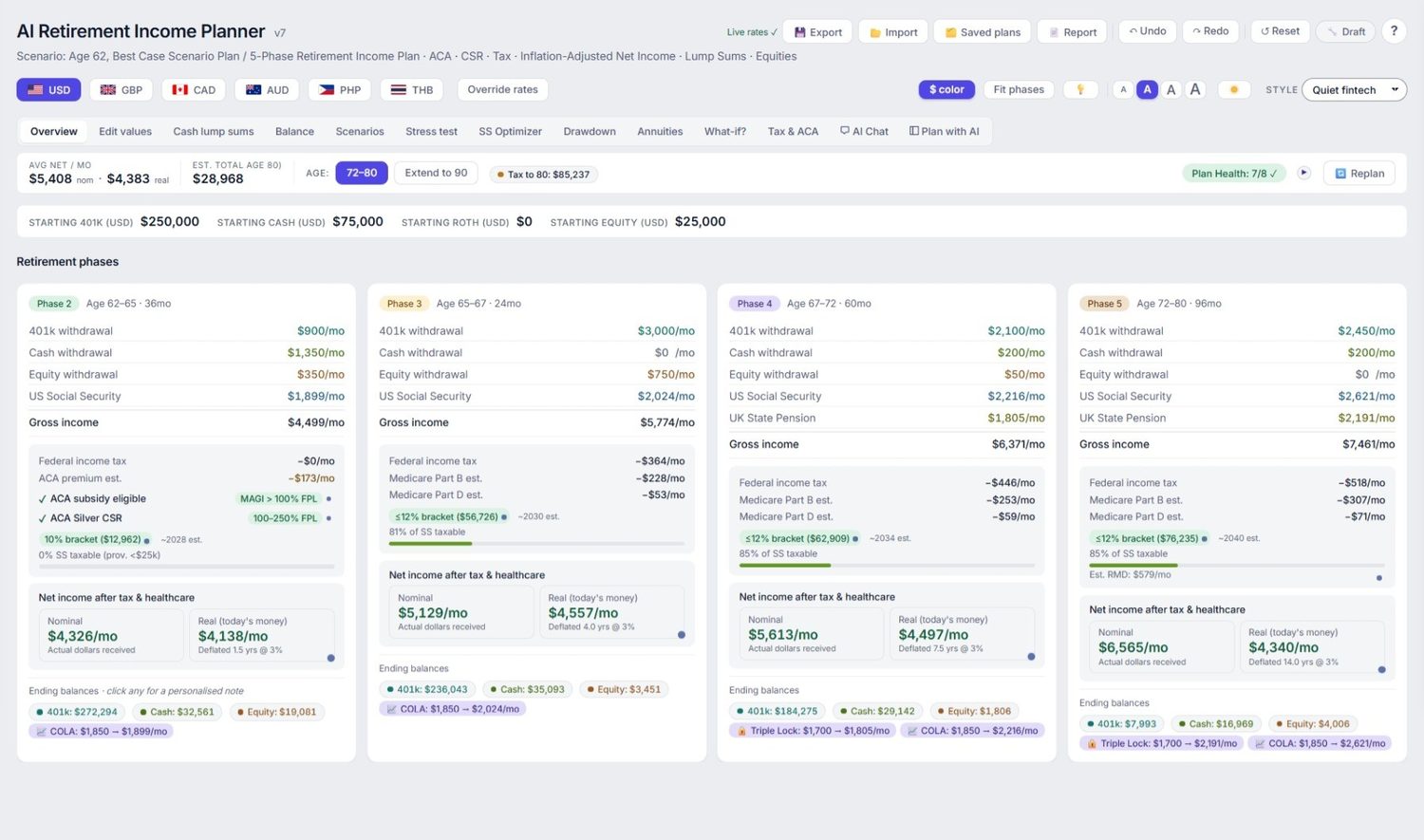
The core is a transparent simulation that steps through retirement one month at a time. Configuration flows from your inputs through a clear pipeline — buildPhaseConfig → calcAllPhases → calcPhase → simPhase — applying compound growth, withdrawals and income for each phase.

Because it’s deterministic, the same inputs always produce the same results, and every figure can be traced back to the rule that produced it. Tax brackets, deductions, FPL thresholds and Medicare costs are each inflation‑adjusted per phase.

The deterministic phase engine output on the dashboard.
Data flow

Exactly what leaves your computer

Every network request the planner is capable of making, when it happens, and what it carries. There is no behavioral analytics, no tracking, no crash reporting and no identifier of any kind in the file — the one thing it reports is the version number it is running, listed below like everything else. This list is the whole of it.

Every outbound network request the planner can make
WhatWhenWhat it sends
Opening the planner Loads with no external files Nothing about you. The file has no external scripts, fonts or stylesheets — charting and all — so the page itself pulls nothing in. It does look up exchange rates as it starts; see the row below.
Your plan & figures Never leaves the file Nothing. Stored in your own browser’s local storage. There is no server to send it to.
Version check Once a day, automatically Asks our site which build is current. Sends nothing at all — not even which version you have; your copy compares the answer locally.
Version beacon Once a day, automatically One number: the version of the planner you are running — for example 370 — so we can tell how quickly an update reaches people instead of guessing. That is the entire message. No name, no email, no identifier, nothing about your plan, and nothing that could link one day’s message to another or to you. It is sent and forgotten: the planner does not read the reply, and if it fails nothing changes.
Live exchange rates Automatically as the planner opens, and again when you refresh them Requests published USD conversion rates from a public rates service. Sends no personal data and no part of your plan — it is the same request whoever makes it. If there is no connection it times out quietly and the planner carries on with its stored rates, which is why it still works offline.
AI co-pilot opt-in Only when you enable it and ask a question This is the exception. A summary of your plan goes to the AI provider you chose, under your own API key. See below.

That table is about the planner file — the thing you download and run. This website is a separate piece of software with its own privacy policy: it carries analytics you can decline, and on some pages an AI assistant you can ask about the product. Neither can see your plan, and the planner never talks to either of them. What the website assistant sends and stores is set out in section 3f of the privacy policy.

The AI co-pilot, stated plainly

The co-pilot cannot answer questions about your plan without seeing your plan. If you switch it on and pick a cloud provider — Anthropic, OpenAI, Google or OpenRouter — a summary of your figures is sent to that provider using an API key you supply and pay for. We never see it, and it never passes through our servers, but it does leave your computer.

Three things follow from that: the co-pilot is off until you turn it on; the rest of the planner works fully without it; and if you want AI and total privacy, you can point it at a local model running on your own machine, which keeps everything offline.

What that summary is: your figures (ages, filing status, balances, withdrawals, pensions, Social Security, and the tax settings for the country and state you asked it to model), the results the engine produced from them, and your question as you typed it.

What it is not: there is no field in the planner for a name, email, address, phone number, employer, or any account, policy or Social Security number — so none can be sent. No login means no user id or profile is attached, your plan notes are excluded, and there is no analytics id or device identifier anywhere in the file. The only free text that leaves is text you wrote yourself: your question, your lump-sum labels and any reason you gave for dismissing a suggestion. Your provider does see the connection itself — your API key and IP address, as with any request — and handles it under their terms, not ours. The longer version is here.

This website is not the planner

Worth separating, because people reasonably assume otherwise. This website uses ordinary analytics, which stay switched off until you accept the cookie banner. The planner you download contains none of it — no analytics, no tracking, no accounts, nothing that knows who you are. Buying does involve our payment provider, as any purchase must. The only thing the product itself ever reports is the version number it is running, once a day, so we can tell whether an update reached anyone; it is in the table above with everything else.

Tax & treaty modeling

US federal brackets with the senior add‑on, Social Security provisional‑income taxation done the IRS way, NIIT and IRMAA with a two‑year lookback, plus flat state tax. International regimes for the UK, Canada and Australia apply the US Foreign Tax Credit under treaty rules.

Monte Carlo methodology

Thousands of randomised market paths with configurable volatility and — importantly — randomised inflation in every run, for a more honest distribution of outcomes. A historical backtest replays real US market history since 1928 against your plan.

Privacy architecture

The entire app is one self‑contained HTML file. State lives in your browser’s local storage; nothing is transmitted. Optional AI runs under your own API key, called directly from your browser — there’s no WebNomad server in the loop and no account to create.

Accuracy & validation

A calculation engine that checks itself

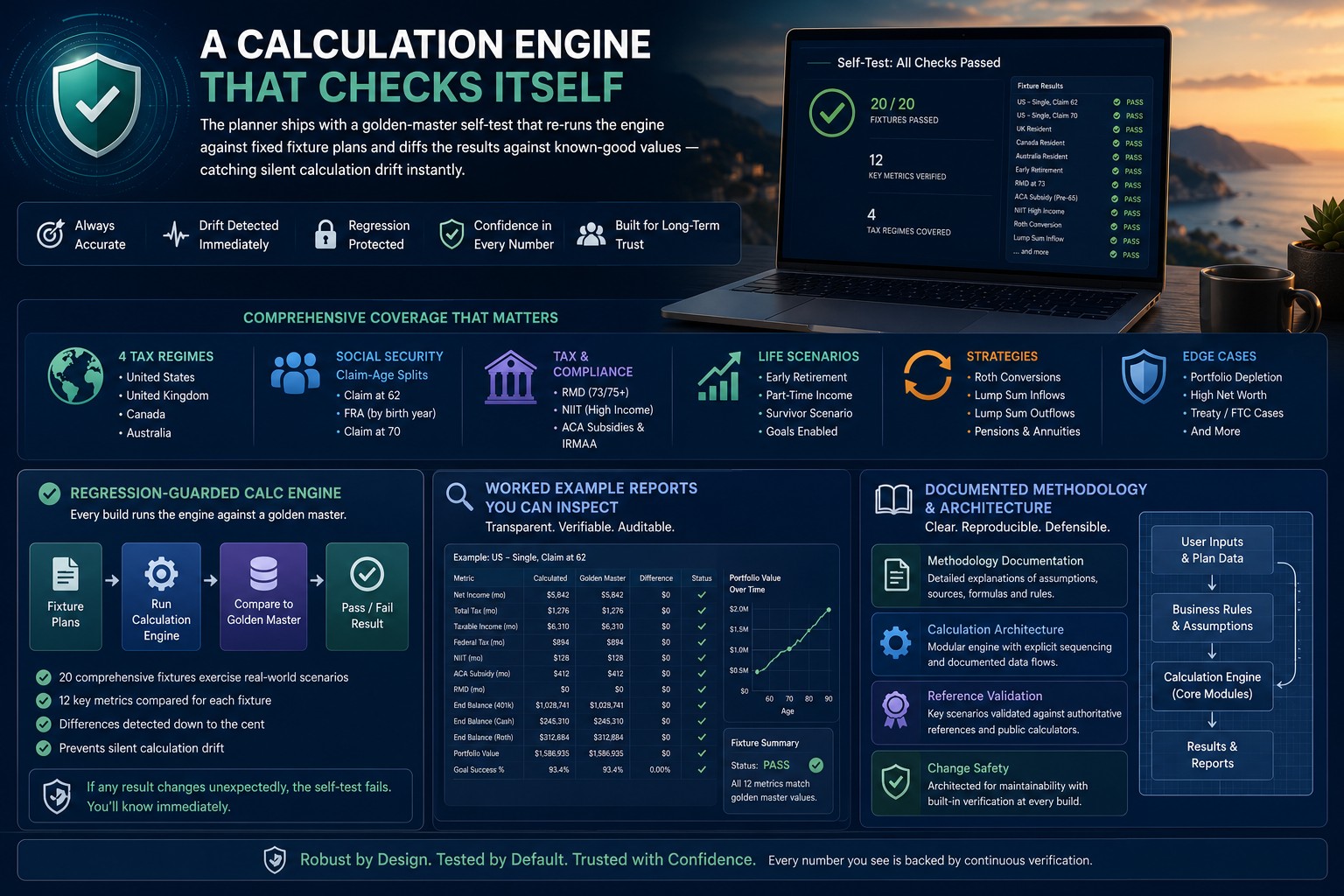
The planner ships with a golden‑master self‑test that re‑runs the engine against fixed fixture plans and diffs the results against known‑good values — catching silent calculation drift instantly. Coverage spans four national tax regimes, Social Security claim‑age splits, RMD/NIIT/ACA, early retirement, Roth conversions, pensions, lump sums and goals.

  • Regression‑guarded calc engine
  • Worked example reports you can inspect
  • Documented methodology & architecture
  • Built‑in help & education AI fact‑checked, with a “Last verified” date
A golden-master self-test re-running the engine against fixture plans to catch calculation drift.
Accessible & honest

Built for confidence, designed for everyone

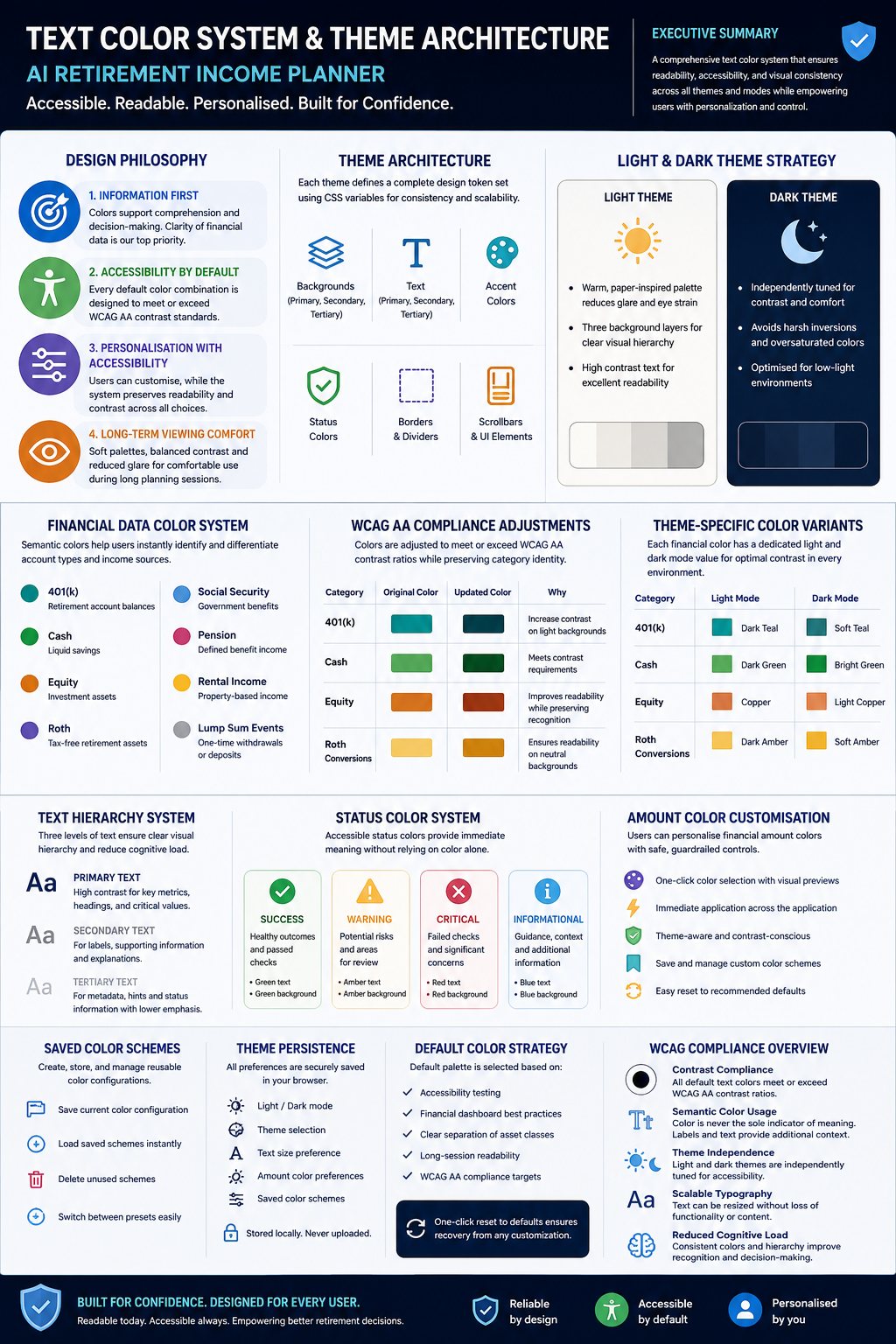
Information first, accessible by default. A WCAG‑AA color system, high‑contrast theme, adjustable text up to 135% and reduced‑motion support make long planning sessions comfortable. The figures distinguish clearly between nominal (future dollars) and real (today’s money) so you’re never misled by inflation.

The planner’s WCAG-AA color and theme architecture system.
Documentation

Read the details for yourself

Full documentation, openly available — because a tool you can question is a tool you can trust.

Free eBook & guides

Build a Retirement Plan You Can Question

The companion book to this planner — how to build a retirement income plan you can stress‑test, interrogate and trust. Paperback & hardback on Amazon.

✔ Get the full eBook free — just join the newsletter. Also included with your planner purchase.

User Guide

A complete walkthrough of every screen and feature in v7.

Download PDF →

Updates & fixes

What has changed in recent builds, how the planner has grown from v1 to v7, and how to pick up the latest version free.

See what's changed →

Features Overview

A concise tour of what the planner can model — phases, currencies, tax treaties, ACA, annuities, AI analysis and more.

Download PDF →

Sample reports

Example Report (v7)

A real, worked plan exported from the planner — see the output for yourself.

Download PDF →

Ask AI about this — ACA Cost‑Sharing Reductions

A sample AI conversation digging into how ACA Cost‑Sharing Reductions affect the example plan.

Download PDF →

Ask AI about this — ACA Subsidy Eligibility

A sample AI conversation exploring ACA premium‑subsidy eligibility for the example plan.

Download PDF →

Export Full AI Chat — Example

A complete exported AI chat transcript, showing how an end‑to‑end advisory session reads.

Download PDF →

Technical documentation

Design & Technical Specifications

The full design spec — the calculation model, data structures, and UI behavior.

Download PDF →

AI Proposal Engine — Technical Overview

How the AI optimization proposals are generated, validated, and applied to a plan.

Download PDF →

Architecture

The structure of the app, its state model and calculation pipeline.

Download PDF →

Best‑Practices Guide

Practical tips for getting the most accurate, realistic plan out of the tool.

Download PDF →

Security Report

The privacy model, data handling and the local‑only architecture.

Download PDF →

Golden‑Master Report

The technical report on the calc‑engine regression guard — coverage, controls and assurance.

Download PDF →

Validation

How outputs are checked and regression‑guarded against drift.

Download PDF →

Methodology

How the calculations work — assumptions, formulas and modeling choices.

Download PDF →
Engineered to be trusted

Serious tools for a serious decision.

Have a technical question? Contact us →