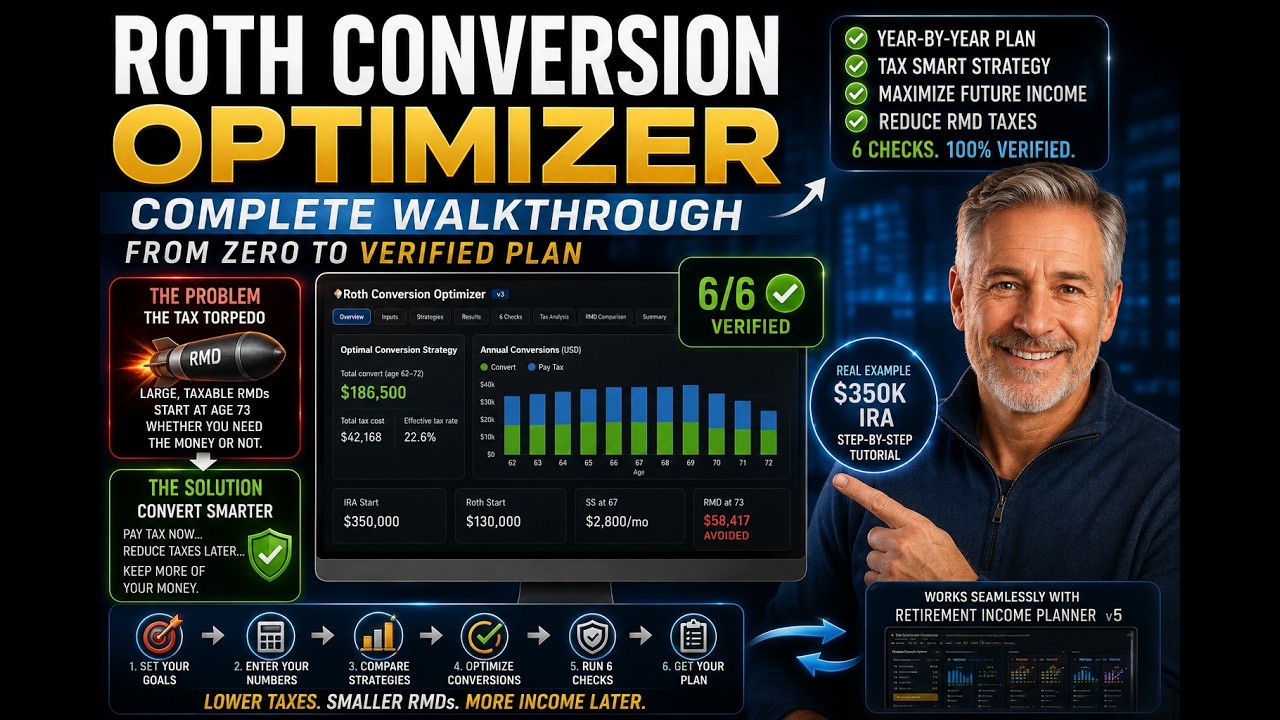
Quick Answer
Money sitting in a traditional IRA or 401(k) is growing tax-deferred, which sounds great until you reach your RMD age: 73, or 75 if you were born in 1960 or later. From that age the IRS forces you to take required minimum distributions (RMDs) whether you need the money or not, and because your balance keeps compounding while the divisor shrinks, those forced withdrawals escalate every year. Stacked on Social Security, they can push you into higher brackets, tax more of your benefits, and trigger Medicare surcharges. That pile-up is often called the tax torpedo.

The Multi-Year Roth Conversion Optimizer is a companion tool that solves the hardest part of avoiding it: not whether to convert, but how much to convert each year. Instead of asking you for a number and reporting the tax, it maps your entire conversion window year by year, shows the bracket space available in each, marks the income cliffs you must not cross, and calculates an optimal conversion for every year automatically. This guide walks through how it works.
Key Takeaways
- The problem is forced income later. Once RMDs start, they grow relentlessly and can trigger higher taxes, more Social Security taxation, and Medicare IRMAA surcharges.
- The fix is converting earlier, at known lower rates. Moving money to a Roth in the years before your RMD age shrinks the future RMD and locks in today's bracket.
- The hard part is the amount. Convert too little and you barely help; too much and you overshoot a bracket or cross the IRMAA or ACA cliff.
- The tool maps the whole window. It shows bracket space year by year, respects every cliff, and calculates an optimal conversion for each year across six strategies.
- It produces a plan you can act on. A year-by-year conversion calendar, scored against confidence checks, that you can hand to your accountant, and export into the main planner.
Why Roth Conversions Matter: the Tax Torpedo
If you do nothing, here is what happens. A traditional IRA that has grown to, say, several hundred thousand dollars by your RMD age produces a first RMD in the tens of thousands, and that is taxable income you did not choose to take. It grows every year: a balance still compounding at 7% combined with an IRS divisor that shrinks with age means the mandatory withdrawal escalates with no ceiling.
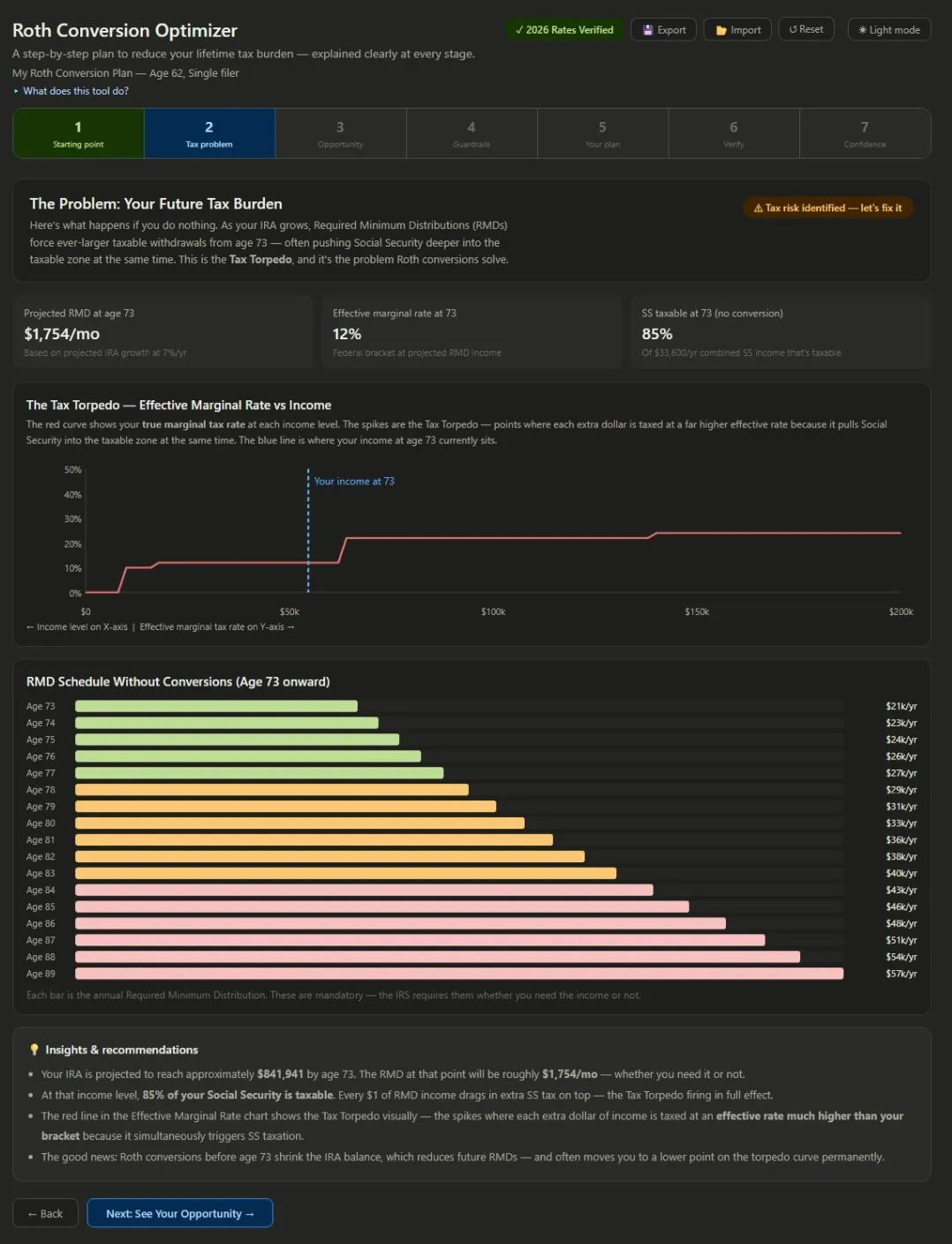
Worse, that extra income does not just get taxed once. It pulls more of your Social Security into the taxable zone, and once your income crosses certain thresholds it lifts your Medicare Part B and D premiums through IRMAA. The marginal cost of one extra dollar of RMD income can be far higher than the bracket alone suggests. This is the same web of thresholds covered in taxes, ACA, and healthcare in early retirement, now working against you in later life. The solution is to voluntarily move money out of the pre-tax account before your RMD age, paying tax today at a known rate, typically 12% or 22%, so it never appears as a forced RMD later. For the case behind that decision, rather than the tool that plans it, see Roth conversions before RMDs.
Roth Conversion Software: Why This Optimizer Works Backwards
Most Roth conversion calculators ask you to enter a conversion amount and then tell you the tax cost. That is useful, but it leaves the hardest part, deciding the amount, on you. It is also why searching for Roth conversion software and finding a calculator feels like a bait and switch: the two words describe opposite jobs.
This optimizer works the other way around. It maps out your entire conversion window from now until RMDs begin, shows exactly how much bracket space is available in each year, identifies the income cliffs you must not cross, and then calculates the optimal conversion amount for every single year automatically. It does this across six strategies from conservative to aggressive, lets you compare them side by side, scores your chosen strategy against a set of confidence checks, and produces a year-by-year calendar you can act on. Everything runs in your browser: no account, no login, no subscription, and nothing sent anywhere.
Step 1: Update the Tax Rates
Before entering anything personal, refresh the tax figures. A button at the top shows amber when the rates have not been verified for the current year. Click it, copy the AI prompt, paste it into any AI assistant, and paste the response back, and the badge turns green. This is the same two-minute rate-refresh workflow the main planner uses, and you only need to do it once a year.
Step 2: Enter Your Portfolio and See the Problem
Next you enter your situation: your age and filing status, your traditional IRA and 401(k) balance and growth rate, any Roth balance, your Social Security amount and claiming age, your spending, and your inflation assumption. As soon as you enter an age, two chips appear: your conversion window (how many years until your RMDs start, at 73 or at 75 if you were born in 1960 or later) and your projected IRA balance at that age if you do nothing, the number you are trying to reduce.
The tool then shows the problem in full: a bar chart of your projected RMD for each year from your RMD age onward, escalating over time, and a "tax torpedo" chart showing how your effective marginal rate steps up as Social Security taxation kicks in. This is the reality that gets locked in at your RMD age if you take no action today.
Step 3: See Your Conversion Opportunity Window
Step three maps the opportunity. One horizontal bar for each year of your conversion window shows exactly how much room you have: the green portion is space up to the top of the 12% bracket, the blue portion is additional room to the 22% ceiling.
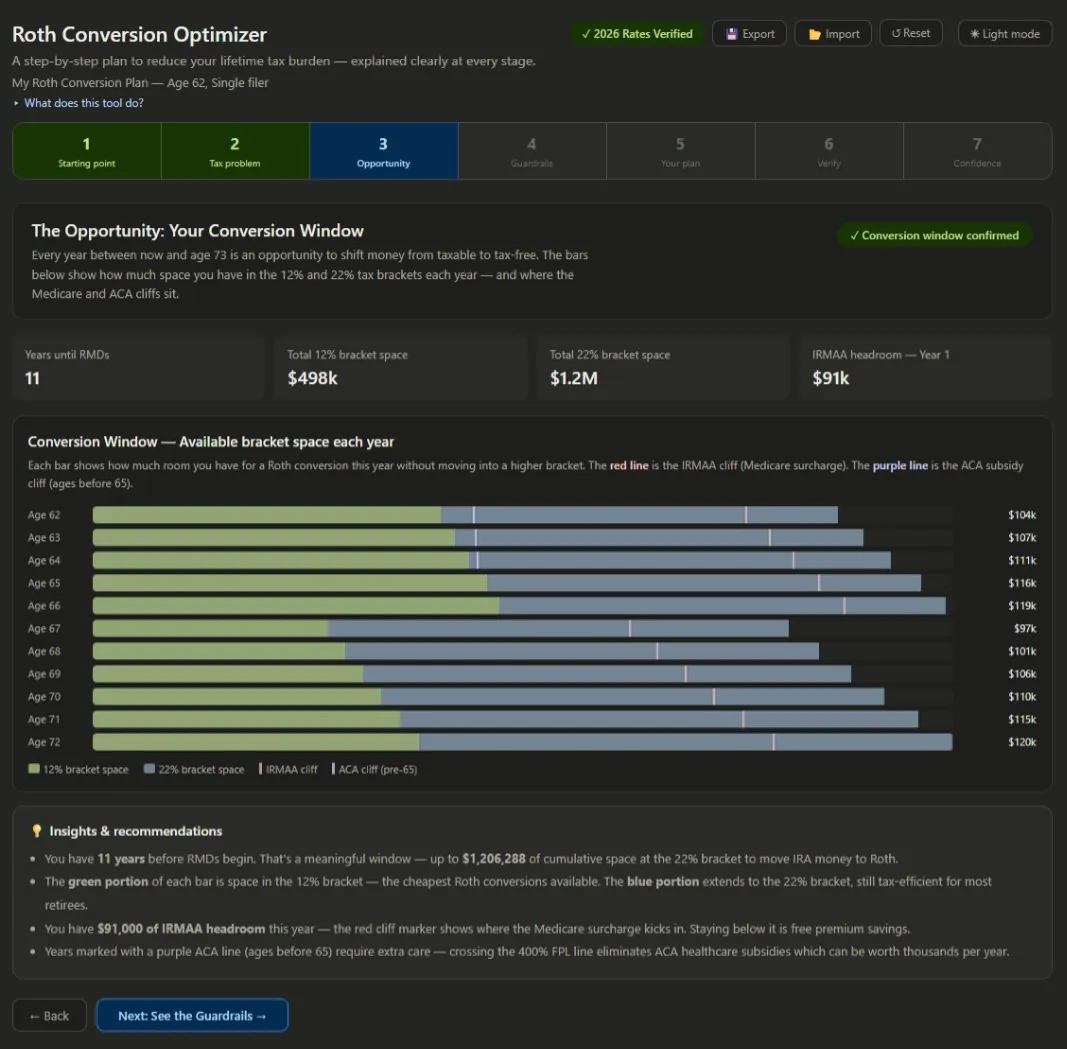
Two lines cross those bars. A red line marks the IRMAA threshold you must not cross once Medicare starts, and in the pre-65 years a purple line marks the ACA subsidy cliff. The early years are often the best opportunity: before Social Security and with little other income, almost all of your bracket space is available, and the binding limit is usually the ACA cliff rather than the bracket. Once Medicare begins at 65, the ACA constraint drops away and IRMAA becomes the only guardrail. The exact threshold figures change each year, so treat the ones on screen as current-year guides.
Steps 4 and 5: Find the Guardrails and Build the Plan
An interactive thermometer lets you drag a hypothetical conversion amount and watch it approach the IRMAA and ACA thresholds, so you can see where the edges are before committing. This slider is for exploration only; it does not set your plan.
The plan itself is built in step five, where you choose a strategy, no conversion, a 12% filter, a 22% filter, IRMAA-safe, an ACA bridge, or an optimal mix, and the tool produces a table with one row per year: the year, your age, base income, the recommended conversion, its tax cost, which bracket it falls in, and your running Roth balance. In the pre-65 years the tool caps conversions to keep you under the ACA cliff; once Medicare starts it fills toward the 22% bracket while staying below the IRMAA line.
Step 6: Compare All Six Strategies
Step six is the comparison view. Six buttons, one per strategy, each summarized by metric cards: total conversions over the window, estimated lifetime tax savings versus doing nothing, the projected RMD reduction, the Roth balance at your RMD age, and the estate-value gain for heirs, which reflects the tax-free advantage of a Roth under the ten-year inherited-IRA rules.
Each strategy also shows a trajectory chart of your IRA balance and Roth balance over time. With an optimal-mix strategy you can watch the IRA decline steadily through the conversion years while the Roth grows, leaving a much healthier shape by your RMD age than the do-nothing baseline where the IRA dominates. Comparing options one at a time is the same principle as saving and comparing scenarios in the main planner.
Step 7: Confidence Checks and a Printable Calendar
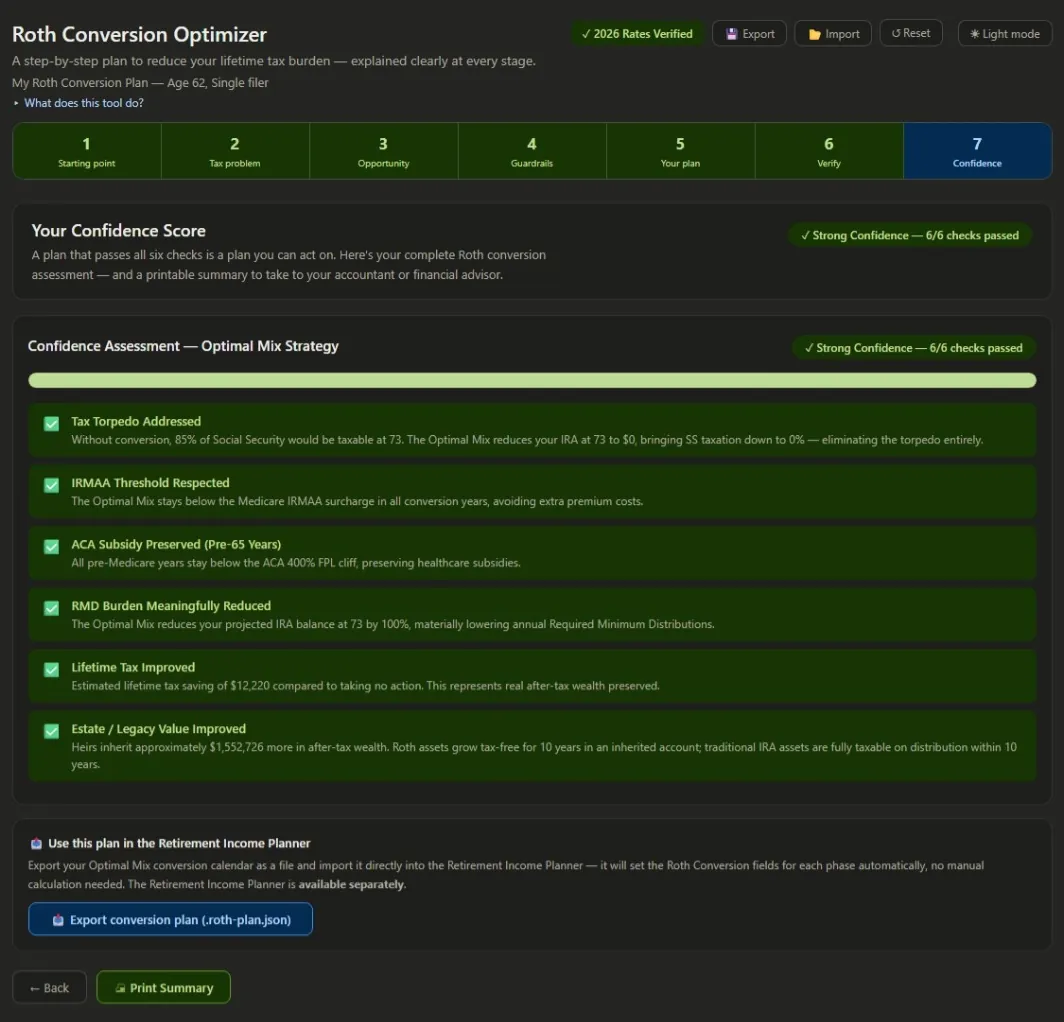
Once you pick a strategy, six automated checks run on it: whether the tax torpedo is neutralized, whether IRMAA is respected in every conversion year, whether the ACA cliff is avoided in the pre-Medicare years, whether the RMD burden is meaningfully reduced, whether monthly income improves, and whether estate value improves. A chip summarizes the result, and below it is a printable summary card: your profile, the chosen strategy, the year-by-year conversion calendar, key metrics, and the checks. This is the one page you print, put in your tax folder, and hand to your accountant at the start of each year.
Sending the Plan Into the Main Planner
The optimizer is a standalone tool, but it integrates tightly with the AI Retirement Income Planner. Step seven includes an export button that packages your complete conversion calendar into a small file. Open the planner, go to the Edit values tab, find the Roth IRA section, and import that file: the planner reads your calendar, averages each year's amounts into the right phase, and fills in the Roth conversion fields automatically, then recalculates your income, taxes, and balances with the conversions in place.
One limitation to know: the optimizer sees your IRA withdrawals, Social Security, and the other income you entered, but it does not know about equity or brokerage withdrawals you may have set up in the planner. If your plan draws from a taxable brokerage during the conversion years, those capital gains count toward your MAGI and can reduce the headroom the optimizer assumed. So after importing, if an ACA or IRMAA check in the planner turns amber or red, simply reduce the conversion in the affected phase until it clears. Together the two tools give the full picture: the optimizer decides how much to convert and why, and the planner shows how those conversions reshape your income all the way to age 90.
FAQ
Is this Roth conversion software, or a calculator?
Both words get used for two quite different things, and the difference is the whole point. A Roth conversion calculator takes an amount you have already decided on and reports the tax. Roth conversion software is expected to decide the amount for you — to look across every year until RMDs begin, find the bracket space in each, respect the cliffs, and hand back a schedule. This is the second kind. You can find it on the products page; it runs in your browser with no account and no subscription.
How does this compare with a Roth conversion decision tree?
A decision tree answers "should I convert?" with a series of yes/no branches — are you in a low-income year, do you expect higher rates later, can you pay the tax from outside the account. Useful once. It cannot answer "how much, this year, and what does that do to the following eleven years", because that question is arithmetic rather than logic. A multi-year optimizer exists precisely because the answer changes every year as balances, brackets, and cliffs move.
Can I use it as a Roth conversion strategy planner for the whole window?
That is what it is for. It maps the conversion window from now until RMDs begin rather than optimizing a single year, which matters because a conversion that looks ideal in isolation can spend bracket space a later year needed more. Six strategies from conservative to aggressive are compared side by side, and the result is a year-by-year calendar rather than a single figure.
Is there a free Roth conversion calculator?
The optimizer is a paid companion tool. Two things near it are free: the retirement tax calculator, which shows what tax and healthcare take out of a plan without any conversion modeling, and the interactive demo, which runs the full planner on a sample plan so you can see how conversions land in a phase before buying anything.
What problem does a Roth conversion actually solve?
It reduces the forced taxable income you face from required minimum distributions starting at 73 (75 if you were born in 1960 or later). By moving money from a pre-tax IRA into a Roth in earlier years, at a known lower tax rate, you shrink the future RMD, which in turn can lower your later tax bracket, reduce how much of your Social Security is taxed, and help you avoid Medicare IRMAA surcharges.
How is this different from a normal Roth conversion calculator?
Most calculators ask what you want to convert and report the tax. This optimizer instead maps your whole conversion window, shows the bracket space available each year, marks the ACA and IRMAA cliffs, and calculates an optimal conversion for every year automatically, across six strategies you can compare side by side. It hands you a year-by-year plan rather than a single number.
How much should I convert each year?
That is exactly what the tool calculates. It fills your available bracket space each year without crossing the IRMAA threshold or, before 65, the ACA subsidy cliff. Convert too little and you barely reduce the future RMD; too much and you overshoot a bracket or lose a subsidy. The optimizer finds the balance for each year and shows the lifetime tax saving of each strategy.
Can I use the conversion plan in the main retirement planner?
Yes. The optimizer exports your conversion calendar to a file that you import into the planner's Roth IRA section, which fills the Roth conversion fields per phase and recalculates the plan. Note that the optimizer does not see brokerage withdrawals in the planner, so if an ACA or IRMAA check turns amber after importing, reduce the conversion in that phase.
Are Roth conversions right for everyone?
No. They create a tax bill today and are not easily reversed, and whether they help depends on your current versus future tax rates, your time horizon, your other income, and your estate goals. This tool is educational and shows the trade-offs; a conversion strategy should be confirmed with a qualified tax professional before you act.
Source Links
- IRS, Roth IRAs: https://www.irs.gov/retirement-plans/roth-iras
- IRS, Required Minimum Distributions FAQs: https://www.irs.gov/retirement-plans/retirement-plan-and-ira-required-minimum-distributions-faqs
- IRS, Retirement Topics, Roth Conversions: https://www.irs.gov/retirement-plans/plan-participant-employee/rollovers-of-retirement-plan-and-ira-distributions
- Medicare.gov, Part B Costs and IRMAA: https://www.medicare.gov/basics/costs/medicare-costs
- AI Retirement Income Planner: https://airetirementincomeplanner.com/
Educational Disclaimer
This article is for general education only. It is not financial, tax, investment, legal, healthcare, Social Security, Medicare, estate, or retirement advice. It does not provide personalized recommendations. Roth conversions create current-year tax liability, can be difficult to reverse, and are not appropriate for everyone. All projections are estimates based on the assumptions entered. Consult a qualified tax professional before making any conversion decision.