
Short Answer
Historical backtesting lets you test a retirement income plan against past market environments. Instead of asking, "What if returns average 6 percent?", it asks, "What would this plan have looked like if I had retired into a real stretch of market history, bad years and all, in the order they came?"
In the AI Retirement Income Planner, the historical backtest sits at the bottom of the Stress test tab, and its success rate also appears as one of three lenses on the Confidence tab. Use it once your base plan is up to date. Read the success rate and the toughest start years, then compare the result with Monte Carlo, the Stress test grid, the Plan Health checks, and a saved copy of the plan.
Key Takeaways
- The historical backtest replays your plan against actual US market returns since 1928.
- It is most useful for spotting sequence-of-returns risk.
- It replays past returns, not past inflation. Your withdrawals stay at the amounts in your plan.
- It works from your balances, withdrawals, and lump sums. It does not model taxes, healthcare costs, or Social Security timing.
- It should not be treated as a forecast.
- A plan that struggles in a backtest is giving you a planning question to investigate.
- Compare the backtest with Monte Carlo and the Stress test before changing real withdrawals.

What Historical Backtesting Does
A retirement plan has to survive time, spending, inflation, taxes, withdrawals, and market returns. The order of those events matters.
Historical backtesting takes a plan and runs it through past market conditions. The point is not to find a perfect match for the future. The point is to see how the plan behaves when good and bad years arrive in the order they really did.
That makes it especially useful for retirees and near-retirees because withdrawals change the math. A bad market early in retirement can do more harm than the same bad market later, because the retiree is drawing money while the balance is down.
Historical backtesting helps you ask:
- What happens if weak returns arrive early?
- Which retirement start years ran out of money, and at what age?
- How far apart are the toughest and the best start years?
- Does the plan only work if returns arrive at their long-run average?
- Does a plan that looks comfortable in the straight-line projection still hold up when the bad years come first?
The backtest is a pressure test using history as the lens.
What The Planner's Historical Backtest Models, And What It Leaves Out
Knowing what goes into the backtest is what makes the result readable.
It uses:
- Actual annual US returns from 1928 through 2025, from the Damodaran dataset at NYU Stern: the S&P 500 with dividends, 3-month Treasury bills, and 10-year Treasury bonds.
- Every overlapping window the length of your plan. A 28-year plan fits 71 start years, and a longer plan fits fewer.
- Your starting balances in the 401k, cash, brokerage, and Roth accounts.
- Each phase's withdrawals from each account.
- Your lump sums, applied at the start of the phase they belong to.
Each account follows the part of history that matches it. The brokerage (equity) account is treated as stocks, cash as T-bills, and the 401k and Roth as a blend of stocks and bonds. That blend is 60/40 unless you change Backtest growth-bucket stock % under Edit values, in the Advanced section, and the setting affects only the backtest. Your own return assumptions are set aside here, because history replaces them.
It leaves out:
- Historical inflation. Withdrawals stay at the fixed amounts in your plan, and the "real" figures are deflated at your own inflation assumption. A start year in the 1970s replays that decade's market returns, but not its price rises. Inflation risk is covered by the Stress test grid and by Monte Carlo instead.
- Taxes and healthcare costs. The backtest moves balances. The tax and healthcare math lives in the main projection.
- Income from outside your accounts, and money moved between them for tax reasons. Social Security, pensions, part-time work, and Roth conversions are not part of it.
That last point matters more than it looks. Changing your Social Security claiming age or a Roth conversion amount does not move the backtest by itself. It moves only when the withdrawals the plan takes change too.
When To Use Historical Backtesting
Use historical backtesting when the plan is already filled in with realistic inputs.
It is most useful when you are:
- Within 10 years of retirement.
- Already retired.
- Comparing two spending levels.
- Deciding which accounts to draw from in each phase.
- Testing an earlier or later retirement age.
- Checking a plan after a balance drop.
- Modeling a large one-time expense.
- Comparing a base plan with a lower-risk version.
- Trying to understand whether a plan is too dependent on average returns.
It is less useful when the plan is incomplete. If ages, balances, withdrawals, or lump sums are still placeholders, the backtest can look precise while resting on weak inputs.
Before You Run The Backtest
Update the plan first.
The backtest reads these inputs directly:
- Current age, retirement start age, and phase ages.
- Current 401k, cash, brokerage, and Roth balances.
- Each phase's withdrawals, and which accounts they come from.
- One-time expenses, and windfalls such as an inheritance or downsizing proceeds, entered as lump sums in the phase they land in.
The rest of the plan still needs to be right, because it decides what those withdrawals have to be. Check:
- Social Security claiming ages and benefit amounts, for both spouses if you are planning as a couple.
- Pension or annuity income.
- Part-time work income.
- Inflation and healthcare inflation assumptions.
- Tax filing status and state tax settings.
- Medicare, ACA, and IRMAA settings.
- RMD settings and any Roth conversions.
- The survivor scenario, if you use it.
Those feed the projection, the Plan Health checks, and the Confidence score rather than the backtest. If Social Security starts in phase 3, the withdrawals you set for phase 3 should reflect it, because the backtest takes those withdrawals as given.
Historical backtesting is not a shortcut around data quality. It makes the plan's assumptions easier to inspect.
How To Use Historical Backtesting In The Planner
Use this workflow:
- Open your plan and update balances, withdrawals, and lump sums.
- Review the base projection on the Overview tab.
- Open the Stress test tab and scroll past the inflation and returns grid to the Historical backtest card.
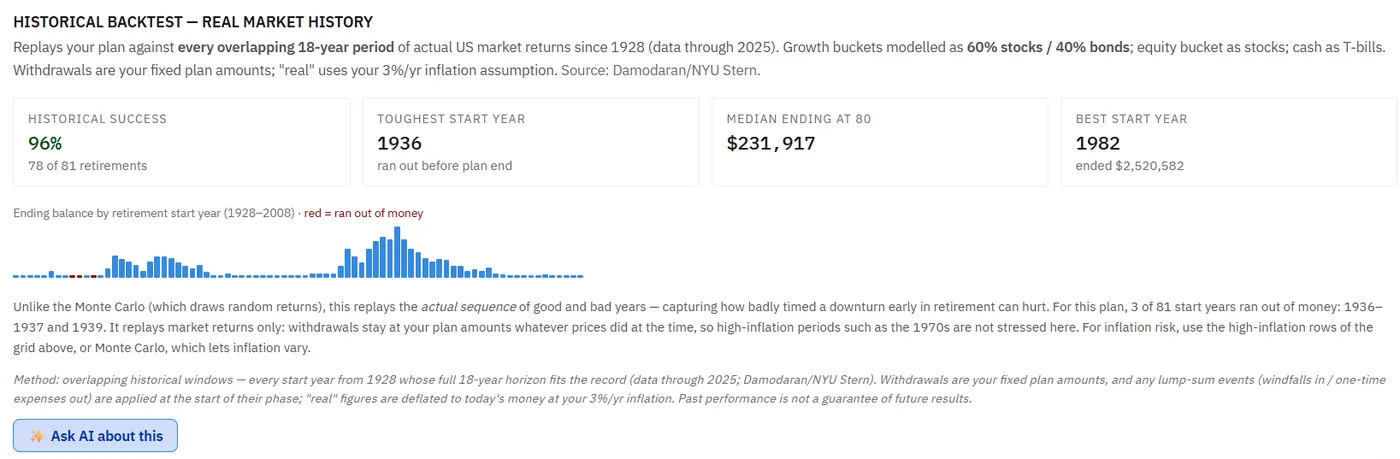
- Read its four figures: historical success, toughest start year, median ending balance, and best start year.
- Scan the bar chart of ending balance by start year. Red bars ran out of money. Hover over a bar to see the age it ran out, or the balance it ended with.
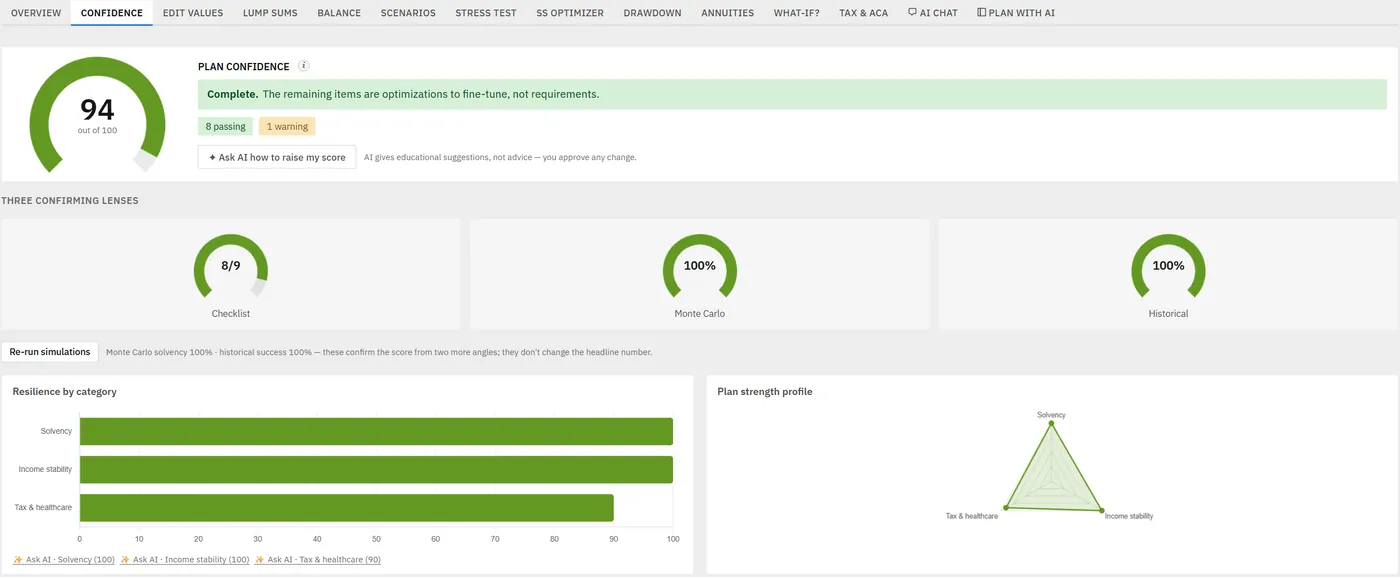
- Open the Confidence tab, where the historical success rate sits beside the Monte Carlo result and the checklist. Press Re-run simulations after any change, because those two dials do not refresh on their own.
- Save the current plan to one of the three saved-plan slots before you change anything.
- Test one change at a time, then return to the backtest.
The key is to move from result to question.
If the backtest looks weak, look for the cause among the things it can see. Are the early phases withdrawing heavily? Does a large one-time expense land early? Is most of the money coming out of the brokerage account, which carries the full swings of the stock market? Is a large share sitting in cash, which only earns T-bill returns? Would retiring a little later change the picture?
Healthcare costs, RMD taxes, and a survivor-income gap are real pressures too, but the backtest cannot see them. They show up in the projection, the Tax & ACA tab, and the Plan Health checks.
The value is in finding the pressure point.
How To Read The Result
Look for patterns instead of one number.
Start with these questions:
- Does the plan run out of money in some start years?
- If it does, at what age does the money run out?
- Are the failures clustered around a few periods, or scattered?
- How far is the toughest start year's ending balance from the median?
- Does the plan depend on strong early returns?
- Does a small reduction in early withdrawals change the result materially?
The success figure is shaded green at 90% and above, amber from 70%, and red below that. Treat the color as a prompt to look closer, not as a grade.
The backtest should help you identify the start years and withdrawals that deserve attention.
Historical Backtesting Vs Monte Carlo
The two answer different questions, and the planner runs both because neither is sufficient alone.
Historical backtesting asks how the plan would have behaved through market sequences that actually happened, which makes it easy to picture: the toughest start years are recognizable periods, not abstractions. Monte Carlo asks how often the plan survives across many randomized paths built from your own return assumptions, which gives a broader range but no story attached to any of it.
They also treat inflation differently. Monte Carlo lets inflation vary from run to run and scales withdrawals with it, unless you set its inflation volatility to zero. The backtest holds inflation at your assumption.
Neither proves a plan will work. Together they show whether it is fragile, flexible, or broadly resilient. If you want the full comparison, including where each one misleads, Monte Carlo vs historical backtesting covers it properly.
How Historical Backtesting Fits With Plan Health
Plan Health checks and historical backtesting should be read together, but they do not measure the same thing.
The Plan Health checks grade the straight-line projection. Two of them look at the backtest's risk from a different angle: Portfolio Survives to End, and Stress Test Resilient, which asks whether the accounts you draw from last to your plan's end age with returns 3 points lower and inflation at 5% for the whole plan. Others cover ground the backtest cannot see at all, including tax bracket efficiency, ACA subsidies, IRMAA, RMDs, survivor income, and whether one-time expenses are funded. If you have not used them before, how to use Plan Health walks through each check.
For example:
- If the backtest fails in several start years while Portfolio Survives to End passes, the plan is relying on average returns arriving on schedule.
- If the backtest looks strong but a tax or IRMAA check is amber, the pressure is in the tax bill, which the backtest never shows.
- If Survivor Income Resilience is flagging, look at the survivor scenario on the What-if? tab. The backtest has no survivor view.
Plan Health checks do not replace the backtest, and the backtest does not replace them. Read together, they turn one result into a list of planning questions.
How Historical Backtesting Fits With Plan Confidence
The Plan Confidence score is built from the Plan Health checks. Monte Carlo and the historical backtest sit beside it on the Confidence tab as two confirming lenses, and the tab says plainly that they do not change the headline number.
So a weak backtest will not pull the score down. A plan can score well on its checks and still fail a meaningful share of historical start years. When those two readings disagree, the disagreement is the most useful thing on the page. A strong backtest supports a strong score, but it does not replace reading the checks behind it.
Use Plan Confidence as a dashboard signal and the historical backtest as a diagnostic view.
In plain English:
- Plan Confidence gives you a broad read of the checks.
- Historical backtesting shows how past return sequences stress your withdrawals.
- Monte Carlo shows a range of simulated paths, with inflation allowed to vary.
- The Stress test grid shows twelve flat, whole-plan combinations of inflation and returns.
- Saved plans let you keep the original while you test a change.
The best planning work happens when those views are read together.
What To Try If The Backtest Looks Weak
Do not jump straight to a permanent lifestyle change.
Save the current plan to a slot first. There are three, and Compare sets your working plan against one of them, so keep the original there as a fixed reference while you compare a changed version against it. Then test one change at a time.
Changes the backtest responds to:
- Lower the withdrawals in the early phases.
- Move a large one-time expense to a later phase, or split it into two smaller Money out events in different phases.
- Change which accounts each phase draws from. Cash follows T-bill returns, the brokerage account follows stocks, and the 401k and Roth follow the blended mix.
- Add a windfall, such as an inheritance or downsizing proceeds, as a Money in lump sum in the phase it arrives.
- Adjust the retirement start age.
- Change the backtest's stock share, to see how sensitive the result is to the mix. This setting changes nothing else in the plan.
Changes that need a matching withdrawal change before the backtest will show them:
- A later Social Security claiming age.
- Part-time income for a phase.
The What-if? tab can also do the search for you. Maximum sustainable spending, set to test against Survives market history, scales every phase's withdrawals up or down together and finds the highest level that still survives your chosen share of historical start years, 90% unless you change it. It is a direct answer to how much you can spend in retirement under this lens.
After each change, reopen the Stress test tab to read the backtest again, press Re-run simulations on the Confidence tab, and check whether any Plan Health check moved.
The goal is to learn which lever has the most useful effect.
A Historical Backtest Workflow, Start To Finish
Imagine a couple planning to retire at 64 and 62.
Their base projection looks fine. Their balances last to the end of the plan. Income charts look stable. Social Security and pensions cover part of the spending need, and Portfolio Survives to End passes.
Then they open the historical backtest.
Several start years run out of money, all of them windows where weak returns came first, because the first phase takes large withdrawals from the 401k before Social Security begins. The couple saves the plan to a slot and tests three changes, one at a time:
- Trim the first phase's withdrawals by a modest amount.
- Move a planned car replacement from the first phase to the second.
- Run Maximum sustainable spending against market history to see the withdrawal level that clears 90%.
The backtest improves, but the most useful result is not a single percentage. The useful result is learning that the first phase's withdrawals were carrying more of the risk than expected.
They also wonder whether a smaller Roth conversion would help. It would not show up here, because the backtest does not model conversions. That question belongs with the Roth conversion tool on the What-if? tab and the tax checks, which is exactly why the backtest is one lens among several.
That is where historical backtesting earns its place. It helps turn a vague worry into a specific planning question.
Common Backtesting Mistakes
Avoid these mistakes:
- Running the backtest before updating balances and withdrawals.
- Treating past periods as a forecast.
- Looking only at the headline success rate.
- Ignoring the age at which a failing start year runs out.
- Changing several assumptions at once.
- Expecting the backtest to show taxes, healthcare costs, or RMDs.
- Assuming the backtest replays historical inflation.
- Changing a claiming age or a Roth conversion and expecting the backtest to move.
- Treating Monte Carlo and historical backtesting as the same tool.
- Assuming a high result means the plan needs no review.
- Assuming a weak result means retirement is impossible.
Historical backtesting is not a verdict. It is a structured way to ask better questions.
Why Backtesting Matters For Retirement Income Planning
Retirement income planning is different from accumulation planning.
Before retirement, market downturns are painful but contributions may continue. In retirement, withdrawals may continue during downturns. That creates sequence risk.
Historical backtesting helps you see that sequence risk in a practical way. It connects the abstract idea of market timing to your own balances, withdrawals, and one-time costs.
That is why the feature belongs inside a broader planner instead of standing alone. The backtest answers the market-sequence question. The projection, the Tax & ACA tab, and the Plan Health checks answer the questions it leaves out, such as Social Security timing, RMDs, Medicare costs, Roth conversions, and spouse income.
The planner's value is that those items can be reviewed together, which is the wider habit described in checking your plan from several angles.
FAQ
Is historical backtesting the same as a market forecast?
No. Historical backtesting uses past conditions to test a plan. It does not predict the next market cycle.
Does the planner's historical backtest include inflation?
Not historical inflation. It replays actual market returns, keeps your withdrawals at the amounts in your plan, and uses your own inflation assumption for its "real" figures. Use the Stress test grid or Monte Carlo to test inflation risk.
Should I use historical backtesting or Monte Carlo?
Use both. The planner shows both results side by side on the Confidence tab. Historical backtesting shows how the plan responds to past sequences. Monte Carlo shows a wider range of simulated outcomes.
What if the backtest result looks bad?
Save the current plan to a slot and test one change at a time. Start with the inputs the backtest reads: withdrawals in the early phases, which accounts they come from, the timing of large one-time expenses, and retirement age.
What if the backtest result looks strong?
Review the plan anyway. Check Plan Health, Plan Confidence, Monte Carlo, Stress Test, survivor assumptions, taxes, healthcare, RMDs, and updated balances.
Can historical backtesting replace professional planning help?
No. It is an educational planning tool. Use official sources and qualified professionals for tax, investment, legal, healthcare, Medicare, Social Security, insurance, and estate questions.
Source Links
- AI Retirement Income Planner: https://airetirementincomeplanner.com/
- WebNomad AI Retirement Income Planner feature page: https://webnomad.webflow.io/pages/ai-ready-retirement-income-planner
- Investor.gov retirement planning resources: https://www.investor.gov/introduction-investing/investing-basics/glossary/retirement-planning
- U.S. Bureau of Labor Statistics Consumer Price Index: https://www.bls.gov/cpi/
- IRS required minimum distributions: https://www.irs.gov/retirement-plans/plan-participant-employee/retirement-topics-required-minimum-distributions-rmds
- Medicare costs: https://www.medicare.gov/basics/costs/medicare-costs
Educational Disclaimer
This article is for general education only. It is not financial, tax, investment, legal, healthcare, insurance, Social Security, Medicare, estate, AI safety, software, or retirement advice. Historical backtesting is based on past conditions and assumptions. Future market returns, inflation, taxes, healthcare costs, life events, and policy rules can differ. Confirm tax, Medicare, Social Security, RMD, withdrawal, investment, insurance, healthcare, inflation, and estate details with official sources and qualified professionals. Screenshots show a sample plan with invented figures and are illustrative only.