
Quick Answer
The safest way to use AI for retirement planning is to keep AI in the role of assistant, not decision-maker.
Use AI to:
- Explain retirement concepts.
- Organize questions.
- Summarize scenario results.
- List assumptions to verify.
- Draft notes for a professional meeting.
- Translate planner output into plain English.
- Suggest scenarios to test.
Do not use AI alone to decide:
- Whether you can retire.
- When to claim Social Security.
- How much to convert to Roth.
- Which account to withdraw from.
- Which insurance or Medicare choice to make.
- How much investment risk to take.
- Whether a tax strategy works.
- Whether a plan is strong enough.
The safe workflow is:
- Put facts into a real retirement planner.
- Run the calculator.
- Ask AI to explain specific outputs.
- Verify rules through official sources.
- Test one scenario at a time.
- Review changes before applying them.
- Save notes about assumptions and open questions.

Key Takeaways
- AI can help explain retirement planning, but it can also produce inaccurate or misleading answers.
- OpenAI's ChatGPT FAQ says outputs may be inaccurate, untruthful, or otherwise misleading at times.
- OpenAI's Data Controls FAQ explains that users can choose whether ChatGPT conversations help improve models.
- Investor.gov warns that AI-generated investment information can be inaccurate, incomplete, misleading, faulty, or made up.
- NIST's AI Risk Management Framework is designed to help manage risks from AI systems.
- Retirement planning needs calculator-backed numbers for taxes, healthcare, Social Security, withdrawals, and risk.
- The AI Retirement Income Planner keeps AI assistance optional and pairs it with user-approved proposals and structured planner output.
Why AI Safety Matters In Retirement Planning
Retirement planning is a high-stakes topic.
A small mistake can affect:
- Taxes.
- Healthcare costs.
- Social Security timing.
- Roth conversion timing.
- Withdrawal order.
- Portfolio longevity.
- Survivor income.
- Cash reserves.
- Medicare premiums.
- ACA subsidy exposure.
AI can sound confident even when a number, rule, date, or assumption is wrong, which is why AI retirement advice needs verified numbers. That is risky because retirement planning often turns on details.
For example:
- A Roth conversion may help in one year and hurt in another.
- A Social Security claim age can affect survivor income.
- ACA income can change healthcare cost before Medicare.
- Medicare IRMAA can be affected by income from two years earlier.
- RMDs can change taxable income later.
- A survivor may file as single after the first spouse dies.
AI can explain these ideas. The numbers still need a planner.
Safe Use Case 1: Explain Concepts
AI is useful for explaining vocabulary.
You can ask:
- "Explain RMDs in plain English."
- "What is the difference between Medicare and ACA?"
- "Why can Roth conversions affect taxable income?"
- "What is sequence-of-returns risk?"
- "How does survivor Social Security differ from a couple's combined benefits?"
This is a good use of AI because the goal is learning. Even a general chatbot can work here; whether ChatGPT can help with retirement planning covers where it explains well and where it should not be trusted.
Even then, verify important rules through official sources such as IRS, SSA, Medicare.gov, HealthCare.gov, and state resources.
AI should help you understand the question. It should not be treated as the source of record.
Safe Use Case 2: Organize Missing Inputs
AI can help turn a vague worry into a checklist.
For example, instead of asking:
Can I retire next year?
Ask:
What inputs should I gather before testing whether I can retire next year?
The answer might include:
- Current account balances.
- Cash reserves.
- Monthly spending.
- Healthcare costs.
- Social Security estimates.
- Pension details.
- Debt payments.
- Tax filing status.
- State tax assumptions.
- Retirement age.
- Life expectancy.
- Planned Roth conversions.
- Major one-time expenses.
That checklist can then be entered into the planner.
This keeps AI in a useful role: helping gather facts before calculations begin.
Safe Use Case 3: Explain Planner Output
AI is more useful after the planner has run the numbers. This is the core of how an AI co-pilot can explain a retirement plan: it translates a calculated result into plain English.
A better prompt is:
My Plan Health check is flagging IRMAA after a Roth conversion. Explain what might be causing that and what scenarios I should test.
Another useful prompt:
Compare these two scenarios in plain English. Scenario A retires at 65. Scenario B retires at 62 and uses cash before Medicare.
This works because the AI is responding to a specific calculated result.
The stronger workflow is:
- Run the base plan.
- Create a named scenario.
- Compare Plan Health, balances, taxes, healthcare, and net income.
- Ask AI to summarize the difference.
- Verify any rule-based claim before acting.
Safe Use Case 4: Prepare Questions For A Professional
AI can help turn planner output into better questions.
Examples:
- "Turn this Roth conversion scenario into questions for my tax professional."
- "List Medicare questions I should ask before retiring at 63."
- "Summarize the survivor-income issues in this plan."
- "Create a checklist for reviewing this Social Security timing scenario."
- "List assumptions my financial professional should review."
This is a good safety habit.
AI helps you prepare. A qualified professional helps review the issue.
Unsafe Use Case 1: Asking For Final Decisions
Avoid prompts that ask AI to decide for you.
Risky prompts include:
- "Should I retire now?"
- "Tell me exactly how much to convert to Roth."
- "Which Medicare plan should I buy?"
- "Which investments should I own?"
- "What account should I spend from first?"
- "How much can I safely spend every month?"
- "Should I claim Social Security at 62?"
These questions need facts, calculations, official rules, and often professional review.
Rewrite them as scenario questions:
- "What assumptions should I test before retiring now?"
- "What inputs affect the Roth conversion amount?"
- "Which Medicare cost assumptions should I model?"
- "How does withdrawal order affect taxes and balances?"
- "Compare Social Security at 62, 67, and 70 using planner output."
The rewrite changes AI from judge to helper, which is the core of what an AI retirement planner should and should not do.
Unsafe Use Case 2: Sharing Sensitive Information Too Broadly
Retirement planning can involve sensitive data.
Examples include:
- Account balances.
- Income.
- Tax filing status.
- Health details.
- Insurance details.
- Family information.
- Home location.
- API keys.
- Estate plans.
- Identity details.
- Login information.
OpenAI's ChatGPT FAQ says users should not share sensitive information in conversations. OpenAI's Data Controls FAQ explains settings for whether conversations help improve models and how Temporary Chats work.
Before using any AI tool, ask:
- What information am I about to share?
- Is this account signed in?
- Is training turned on or off?
- Is this a temporary chat?
- Is this a business, personal, or local tool?
- Does the tool send data outside my browser?
- Can I remove names and exact account numbers?
In the AI Retirement Income Planner, optional AI/API features can make network calls when the user chooses to use them. Users who want a local AI option can use local Ollama, which can run without a cloud API key.
Unsafe Use Case 3: Trusting AI Sources Without Checking
AI can cite the wrong rule, summarize an old rule, or mix concepts from different contexts.
This is dangerous in retirement planning because rules change and details matter.
Check official sources for:
- Social Security rules through SSA.
- Medicare rules through Medicare.gov.
- ACA Marketplace rules through HealthCare.gov or a state Marketplace.
- Tax rules through IRS.
- State tax rules through state revenue agencies.
- Required minimum distribution rules through IRS.
- Investment professional registration through official regulator tools.
Investor.gov warns that AI-generated information can be inaccurate, incomplete, misleading, faulty, or made up. It also cautions investors to confirm underlying sources and review multiple sources before making investment decisions.
Treat AI as a helpful draft, not an authority.
A Safer Prompt Formula
Use this prompt structure:
text
I am using AI for education and scenario review only.
Here is the calculated planner output: [paste summary, not sensitive data].
Explain what changed between Scenario A and Scenario B.
List assumptions I should verify through official sources.
Do not make a final decision for me.
This prompt does four useful things:
- It defines the role.
- It gives calculated output.
- It asks for explanation.
- It asks for verification items.
That is safer than asking AI to invent a plan from scratch.
A Safe AI Retirement Planning Workflow
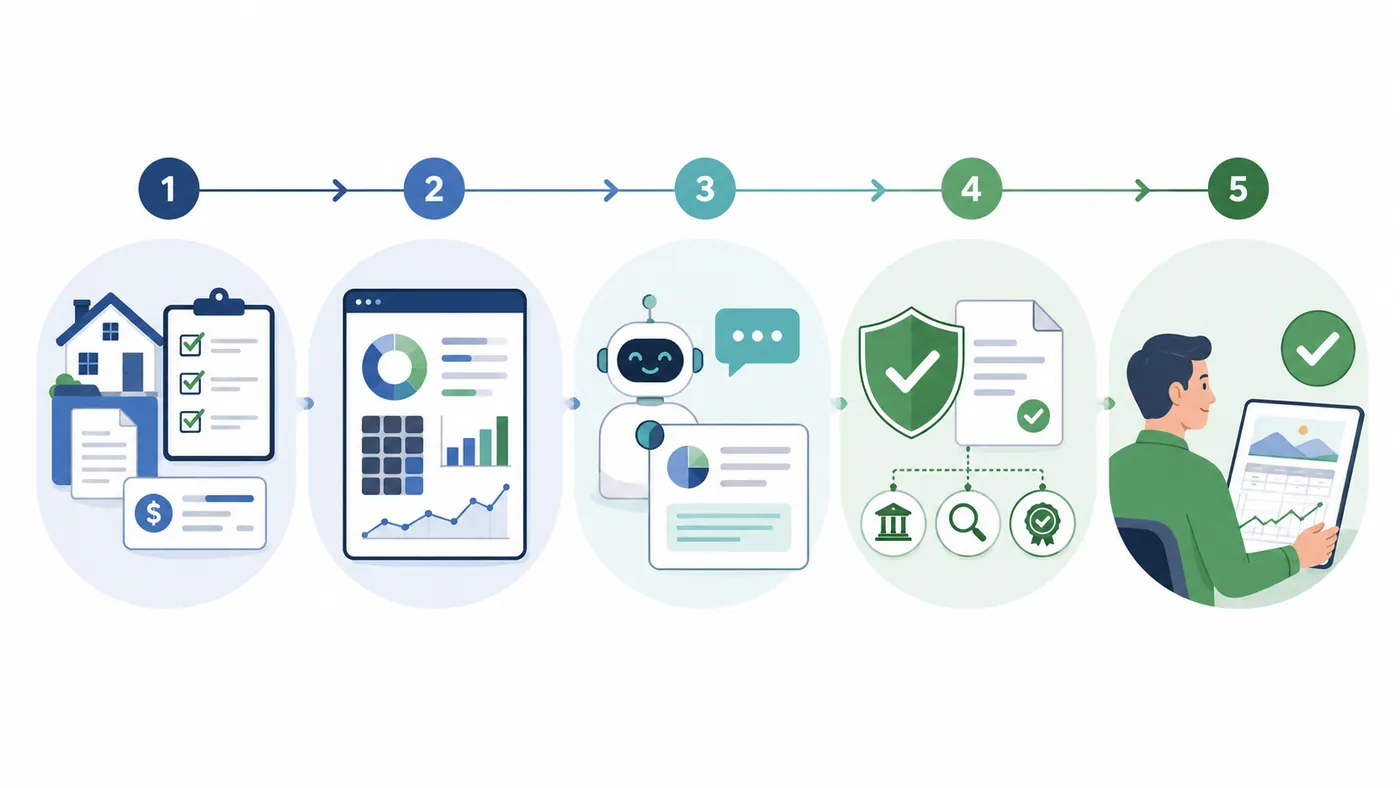
Use this workflow:
- Gather facts outside the AI chat.
- Enter facts into the retirement planner.
- Run the base plan.
- Review Plan Health.
- Save the base scenario.
- Create one what-if scenario.
- Compare taxes, healthcare, Social Security, balances, and net income.
- Ask AI to explain the difference.
- Verify any rule-based claim through official sources.
- Save notes about assumptions.
- Review with a qualified professional if the decision is material.
This workflow keeps the calculator in charge of the math and AI in charge of explanation.
How The AI Retirement Income Planner Supports Safer AI Use
The AI Retirement Income Planner is designed so AI works beside the plan.
Relevant features include:
- AI Chat for plan questions.
- Plan review.
- Learn-the-planner mode.
- Proposal workflows.
- Plan with AI sidebar.
- User-approved AI proposals.
- Plan Health checks.
- Plan Confidence score.
- Scenarios.
- What-if tools.
- Stress Test.
- Monte Carlo.
- Historical backtesting.
- Social Security tools.
- Roth, RMD, IRMAA, ACA, tax, and healthcare tools.
- Reports and notes.
- Local Ollama support.
The important part is the structure.
The planner can calculate a plan first. AI can then help explain the result or propose a change. The user reviews the proposal before applying it.
That is safer than asking AI to make up numbers, which is why AI needs a retirement calculator underneath the conversation.
Red Flags When Using AI For Retirement Planning
Slow down if AI output:
- Gives a precise answer without showing assumptions.
- Treats a tax or Social Security rule as simple.
- Ignores healthcare.
- Ignores survivor income.
- Ignores account type.
- Ignores state or residency.
- Uses outdated figures.
- Pushes urgency.
- Claims certainty.
- Asks for sensitive details that are not needed.
- Gives investment instructions without context.
- Sounds persuasive but cannot point to a source.
Investor.gov also warns about AI-related hype, impersonation, and claims of quick profits or low-risk large gains.
If an AI answer creates pressure, pause. Good retirement planning can tolerate a careful second look.
Safe AI Retirement Planning Checklist
Before relying on any AI-assisted planning output, check:
- Did I remove unnecessary sensitive details?
- Did I run the numbers in a real planner?
- Did I save the base scenario?
- Did I test one change at a time?
- Did I review Plan Health?
- Did I compare taxes, healthcare, balances, and net income?
- Did I check official sources for rules?
- Did I write down assumptions?
- Did I use AI for explanation rather than final decisions?
- Did I get professional review where the stakes are high?
FAQ
Can AI be used safely for retirement planning?
Yes, if AI is used for explanation, organization, and scenario review while calculator math, official sources, user judgment, and professional review handle the high-stakes parts.
What is the biggest risk of using AI for retirement planning?
The biggest risk is treating confident AI text as if it were a verified retirement plan. AI can produce inaccurate, incomplete, outdated, or persuasive-sounding answers.
Should I share my full financial details with AI?
Be cautious. Remove unnecessary personal details, account numbers, login information, exact addresses, and sensitive health or family details. Review the data controls and privacy behavior of the AI tool you use.
What should AI do in a retirement planner?
AI should explain results, summarize tradeoffs, help build checklists, suggest scenarios to test, and help prepare questions. It should not replace the calculator or user review.
Why does calculator-backed AI matter?
Calculator-backed AI matters because retirement planning depends on structured math for taxes, healthcare, Social Security, withdrawals, balances, and risk. AI can explain the result after the calculator runs.
How does the AI Retirement Income Planner use AI safely?
The planner pairs optional AI assistance with structured planner output, Plan Health, scenarios, What-if tools, Confidence, reports, and user-approved AI proposals.
Source Links
- OpenAI, ChatGPT General FAQ: https://help.openai.com/en/articles/6783457-chatgpt-general-faq
- OpenAI, Data Controls FAQ: https://help.openai.com/en/articles/7730893-data-controls-faq
- Investor.gov, Artificial Intelligence and Investment Fraud: https://www.investor.gov/introduction-investing/general-resources/news-alerts/alerts-bulletins/investor-alerts/artificial-intelligence-fraud
- NIST, AI Risk Management Framework: https://www.nist.gov/itl/ai-risk-management-framework
- AI Retirement Income Planner official site: https://airetirementincomeplanner.com/
- AI-Ready Retirement Income Planner product overview: https://webnomad.webflow.io/pages/ai-ready-retirement-income-planner
- Local capability audit used for product scope:
15-Planner-Capabilities-Audit.md
Educational Disclaimer
This article is for general education only. It is not financial, tax, investment, legal, healthcare, insurance, privacy, cybersecurity, Social Security, Medicare, estate, AI safety, or retirement advice. AI output and planner projections depend on inputs and assumptions, and real-world outcomes can differ.