
Short Verdict
The best retirement planning software without a subscription is the tool that lets you model the retirement decisions you actually need to test, without forcing you into a recurring plan you do not want.
For privacy-focused DIY planners who want a one-time purchase, no account requirement, no bank connection, and a retirement-income-specific workflow, the AI Retirement Income Planner is a strong fit.
It is built for people who want to model:
- Retirement income by phase.
- Social Security timing.
- Spouse and survivor planning.
- Taxes.
- ACA and Medicare costs.
- IRMAA.
- Roth conversions.
- RMDs.
- Withdrawals by account type.
- Scenario comparison.
- Stress tests.
- Monte Carlo and historical backtesting.
- Optional AI help.
Subscription tools can still be excellent for some users. ProjectionLab, MaxiFi, and Boldin all serve real needs. But if the search is specifically for no subscription, no account, and local ownership, the field gets much narrower, for reasons the one-time purchase model addresses directly.

Key Takeaways
- No-subscription retirement planning software should still model taxes, healthcare, withdrawals, Social Security, inflation, and risk.
- A cheap or free calculator can be useful, but it may miss retirement income timing.
- A spreadsheet can avoid subscriptions, but it can be harder to maintain and audit.
- Cloud subscription tools may offer strong features, but users should compare cost, account requirements, data handling, and renewal terms.
- The AI Retirement Income Planner is a one-time purchase, single-file browser planner with no account requirement and no bank connection.
- Optional AI features use network access when the user chooses to use them, and the planner looks up current exchange rates when it opens, without sending any plan data.
- Buyer-intent readers should verify current prices and terms directly with each vendor before purchasing.
Free Retirement Planning Software: What Is Actually Free
"Free" and "no subscription" get searched as if they were the same thing, and they are not. No subscription means you are not billed every month. Free means you are not billed at all — and in this market that usually means one of four arrangements, only two of which are genuinely free:
- Free and funded by something else. Broker and fund-company planners are free because they are attached to accounts held with that firm. The tool is real; the business model is the assets.
- Free and funded by your data. Aggregators that link your bank and investment accounts are free at the point of use. What is being exchanged is visibility into your finances.
- Free tier of a subscription. Usually a capped version of a paid planner, which is a trial with no end date rather than a free tool.
- Free because it is small. Single-purpose calculators on advice sites cost nothing because they answer one question and stop.
Against that, here is the honest position of the tool this site sells, since a page ranking for "free retirement planning software" ought to say so plainly rather than bury it:
- The retirement tax calculator is free. No sign-up, no email, no account. It takes savings and a monthly withdrawal and shows the income tax and healthcare cost taken out, and the net income left.
- The interactive demo is free. It is the full planner running on a sample plan, so you can see how the phases, taxes, healthcare and Roth conversions behave before deciding anything.
- The planner itself is paid — once. It is a one-time purchase rather than a subscription, which is the distinction this article is about.
If your requirement is genuinely "$0 forever", a spreadsheet or a broker's planner is the honest answer, and the spreadsheet comparison sets out what that costs you in time and in modeling depth. If what you actually want is "no recurring bill", that is a different requirement, and it is the one the rest of this page answers.
What Counts As No-Subscription Retirement Planning Software?
For this article, "without a subscription" means:
- No required annual renewal for the downloaded planner.
- No monthly fee to keep using the planner file.
- No account requirement for the core planning file.
- No bank or brokerage connection required.
- User-owned export or backup option.
- Retirement planning features that work without an ongoing cloud service.
That definition is stricter than "free to start."
A tool can be free to start and still be account-based. A tool can be inexpensive and still be annual. A tool can have a lifetime plan and still depend on a hosted account. A tool can be private by policy and still operate as a cloud app.
None of those models are automatically bad.
They are different from owning a planning file.
Comparison Table
| Tool or approach | Best fit | Subscription? | Account required? | Bank connection required? | Main strength | Main tradeoff |
|---|---|---|---|---|---|---|
| AI Retirement Income Planner | Privacy-focused retirement income planning | No subscription for downloaded planner | No | No | One-time purchase, local browser-based modeling, taxes, healthcare, Social Security, scenarios, risk tools, optional AI | User enters data manually and manages backups |
| Spreadsheet template | Simple DIY model | Usually no | No, unless cloud-hosted | No | Flexible and familiar | Easy to break formulas or miss tax and healthcare logic |
| ProjectionLab | Visual web-based financial planning | Yes for Premium and Pro tiers | Yes | Not required for manual planning | Strong modeling, Monte Carlo, historical backtesting, tax tools, reports, scenarios | Annual subscription for paid tiers |
| MaxiFi | Economics-based lifetime planning | Yes | Yes | Not positioned as bank aggregation | Lifetime spending, Social Security, tax, Monte Carlo, Roth conversion features | Annual subscription tiers |
| Boldin | Guided account-based planning | Upgrade tier | Yes | Not required to start | Free start, Chance of Success Score, Monte Carlo, guided workflow | Paid upgrade and account-based web app |
| Pralana Gold (Excel) | Detailed DIY modeling in a spreadsheet | No, one-time purchase with optional paid renewals | No | No | Deep tax and Roth conversion modeling, highly detailed inputs | Runs in Excel, so it inherits spreadsheet fragility and a steep learning curve |
| Pralana Online | The same modeling as a web app | Yes, annual | Yes | No | Same depth without the spreadsheet | Annual subscription, and your plan lives on their service |
Prices and tiers change, and the bank-connection column reflects what each tool requires to build a plan rather than what it optionally supports. Check each official pricing page before buying.
A note on Pralana, because it is the closest comparison. It is the best-known name in one-time-purchase retirement planning, and it is worth understanding how it is sold. The Excel product, Pralana Gold, is bought once at around $99 with optional paid renewals of about $49 a year, which keep the tax tables current. The web product, Pralana Online, is a genuine annual subscription at roughly $119 for the first year and $89 after that. So the same brand sits on both sides of this comparison, which is a useful reminder that "no subscription" is a spectrum rather than a badge. Figures were checked in September 2026 and will move; the vendor's pricing page is the authority.
What A Serious Retirement Planner Should Include
A retirement planning tool should do more than ask for a savings balance and a retirement age. It has to support the whole job of retirement income planning: turning a pot of savings into a monthly income that survives taxes, healthcare, and decades of inflation.
At minimum, look for:
- Monthly or annual retirement income projection.
- Separate account types.
- Social Security timing.
- Spouse and survivor modeling.
- Pension income.
- Cash, taxable, Roth, and tax-deferred withdrawals.
- Inflation.
- Healthcare cost assumptions.
- Medicare and IRMAA planning.
- ACA planning before Medicare.
- RMD estimates.
- Roth conversion modeling.
- Tax assumptions.
- Scenario comparison.
- Stress testing.
- Monte Carlo or historical testing.
- Printable reports or export.
- Clear data ownership.
The more complex the household, the more these features matter.
The risk tools also differ in useful ways. Monte Carlo and historical backtesting test the same plan from two angles, and a serious planner should offer both.
A single person retiring at 68 with Social Security and modest withdrawals may need less. A couple retiring at 62, delaying Social Security, using ACA coverage, considering Roth conversions, and worrying about survivor taxes needs more.
Best No-Subscription Fit: AI Retirement Income Planner
The AI Retirement Income Planner is designed for a specific buyer:
Someone who wants retirement income planning power without a yearly software bill.
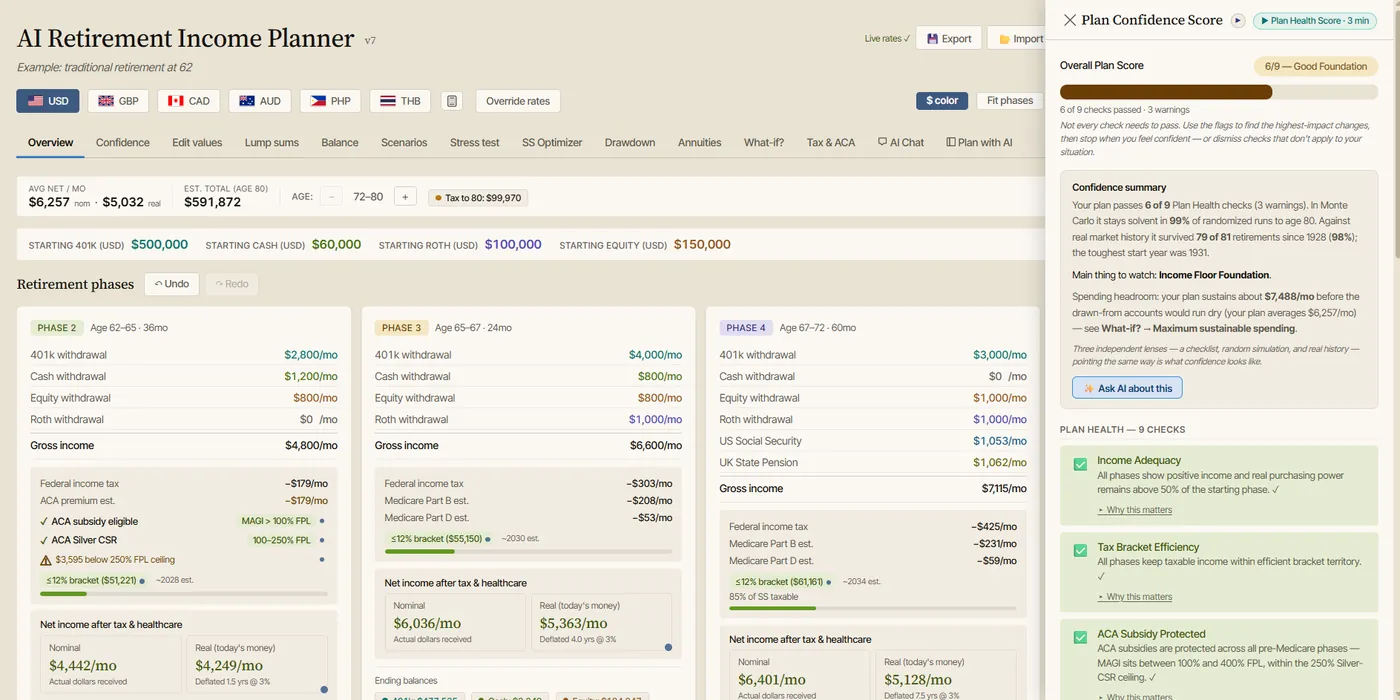
The official product site describes it as a planner that models income, taxes, Social Security, healthcare, and withdrawals month by month, privately in the browser. The site also says it is a buy-once product with no subscription, no account requirement, and no bank connections.
The local audited planner file confirms the same core positioning:
- Single self-contained HTML file.
- Runs locally in a modern browser.
- No account required.
- No subscription for the downloaded planner.
- No bank, brokerage, payroll, or account aggregation.
- Plan data is stored in browser localStorage.
- Manual JSON export/import is available.
- Report preview can be printed or saved as PDF through the browser.
That makes it different from most cloud planning apps.
It is closer to owning a serious planning workbook, except the interface is built around retirement income tabs, charts, scenarios, risk tools, help content, and optional AI assistance.
Best For
The planner is best for users who want to model:
- Early retirement.
- Couples.
- Survivor planning.
- Social Security claiming ages.
- Tax-aware withdrawals.
- Roth conversions.
- RMDs.
- Medicare IRMAA.
- ACA years before Medicare.
- Healthcare inflation.
- Cash bridges.
- Drawdown strategies.
- Annuities.
- Expat or multi-currency planning assumptions.
- Stress tests.
- Monte Carlo and historical backtesting.
- Plan notes and reports.
Less Ideal For
It may be less ideal if you want:
- Automatic bank and brokerage aggregation.
- Daily budgeting.
- Expense tracking.
- Cloud sync across multiple devices.
- Advisor-managed planning.
- A mobile-first app.
- A tool that chooses investments for you.
Those are intentionally outside its core scope.
The planner is built for retirement income planning, education, and confidence. It is not a budgeting app, robo-advisor, brokerage, or account aggregator.
Why No Subscription Matters
Subscriptions are not automatically bad.
They can fund development, support, hosting, security, and updates.
But subscriptions create tradeoffs:
- Long-term cost can exceed the original purchase price.
- Access can depend on renewal.
- The account may be cloud-based.
- Privacy depends on vendor policies and security.
- Features can move between tiers.
- Export options may matter if the user leaves.
For a retirement planning tool, those tradeoffs can feel personal because the data is personal.
The user may enter:
- Account balances.
- Retirement ages.
- Social Security estimates.
- Spouse information.
- Pension details.
- Health costs.
- Tax assumptions.
- Planned moves.
- Survivor concerns.
- Notes about family support.
Some users are comfortable with a cloud planning account. Others prefer a local file and manual backups.
The important point is to choose the model deliberately.
How Subscription Competitors Fit
This article is about no-subscription planning, but many readers will compare subscription tools anyway.
Here is the fair version.
ProjectionLab
ProjectionLab is a strong web-based planning tool for users who like visual modeling, multiple plans, Monte Carlo simulation, historical backtesting, scenario comparison, tax tools, ACA subsidy planning, Roth conversion modeling, and reports.
Its official pricing page lists a free Basic tier, a Premium tier at $129 per year, and a Pro tier for advisors at $549 per year as of the page checked for this article. The Premium tier lists features such as cash-flow projections, tax optimization, withdrawal strategies, What-if scenarios, compare mode, Roth conversions, ACA subsidies, downloadable reports, multiple plans, and international planning.
ProjectionLab may fit users who are comfortable with an annual web-app model and want a polished visual planning environment.
It is not the cleanest answer for someone whose first requirement is no subscription.
MaxiFi
MaxiFi is an economics-based planning tool focused on lifetime spending, Social Security, taxes, Roth conversions, and living-standard planning.
Its official pricing page lists annual Standard, Premium, and Premium Plus tiers. As of the page checked for this article, Standard was listed at $109 per year, Premium at $149 per year, and Premium Plus at $359 per year. The page lists features such as lifetime financial planning, scenario comparison, Social Security timing, tax-efficient withdrawals, Living Standard Monte Carlo, Roth Conversion Optimizer, life insurance contingency planning, and reports.
MaxiFi may fit users who want an economics-based annual spending model and are comfortable with a subscription.
It is not a no-subscription purchase.
Boldin
Boldin, formerly NewRetirement, is a guided web-based planning platform.
Its official signup page says it is free to get started and that users can upgrade to PlannerPlus. It also says the tool includes a Chance of Success Score, Monte Carlo analyses, what-if scenarios, and planning insights.
Boldin may fit users who want a guided web planning experience and a free starting point.
Users who are specifically avoiding accounts and recurring upgrade models should verify current terms before committing.
Spreadsheet vs No-Subscription Software
A spreadsheet is the original no-subscription retirement planner.
It can be a good fit if:
- Your situation is simple.
- You understand the formulas.
- You want full control.
- You do not mind building logic yourself.
- You have time to check and update assumptions.
The problem is not spreadsheets.
The problem is hidden complexity.
Retirement planning can require:
- Social Security timing.
- Taxable Social Security.
- Federal tax brackets.
- RMDs.
- Roth conversions.
- ACA income.
- Medicare and IRMAA.
- Survivor filing status.
- Account-specific withdrawal rules.
- Healthcare inflation.
- Sequence-of-returns stress tests.
- Monte Carlo or historical testing.
A spreadsheet can model those things, but the user has to build or trust the model.
A no-subscription planner can give the user local ownership while reducing formula-maintenance work.
For a closer look at that tradeoff, see retirement spreadsheet vs retirement planning software.
What "Private" Actually Means Here
Privacy is the other half of the no-subscription question, and it is worth being precise about, because vendors use the word to mean two quite different things.
Some tools mean "we protect the data in your account." There is an account, the plan lives on their servers, and privacy is a promise about how they handle it.
Others mean "there is no account to protect." The plan never leaves your machine, so there is nothing on a server to leak, subpoena or sell.
Neither is automatically the right answer. If you want your plan on your phone, your laptop and your tablet, an account is the mechanism that does that, and a good vendor's promise is worth something. If your instinct is to disclose as little as possible, the second model asks less of you in the first place. Knowing which one a tool means is the point.
The Privacy Tradeoffs Nobody Advertises
A local planner is not free of downsides, and a comparison that pretends otherwise is not much use.
Local storage is private, but it is not a backup. Browser storage lives on one device. Clear the wrong setting, replace the laptop, or have a disk fail, and the plan is gone. Export a JSON copy and keep it somewhere you trust. That is a real chore a cloud tool would have done for you.
Manual entry discloses less, but it is manual. No bank connection means no third party holding read access to your accounts. It also means you type your balances and update them yourself.
Optional AI changes the data flow, and you should treat it as a decision. In this planner the AI is optional and off until you add a key, but when you do use it, the plan summary goes to whichever provider you chose. So do model discovery, tax-rate lookup, the help-content audit and the linked videos. Any of those can be left alone; none of them is required to build a plan. Exchange rates work differently: the planner looks them up automatically when it opens, and that request carries no plan data.
A local file still needs device security. Software that keeps your data on your machine has moved the risk rather than removed it. Disk encryption and a screen lock now matter more, not less.
Private Does Not Mean Feature-Poor
The usual assumption is that staying private means a spreadsheet, and giving up anything sophisticated. That trade stopped being necessary a while ago, which is really the point of the retirement spreadsheet vs retirement planning software comparison.
A planner that never phones home can still model federal and state tax, taxable Social Security, ACA subsidies and the cliff, Medicare premiums and IRMAA, healthcare inflation, Roth conversions, RMDs, spouse and survivor planning, scenario comparison, stress tests, Monte Carlo and historical backtesting. All of that is arithmetic, and arithmetic does not need a server.
Privacy Questions To Ask Before Buying
Before choosing software, ask:
- Does the tool require an account?
- Does it require bank or brokerage connections?
- Where is plan data stored?
- Can you export your data?
- Can you delete your data?
- Does the tool sell data?
- Does it use third-party analytics?
- Does it require a cloud service to run?
- Can you keep using it if you stop paying?
- Does optional AI send plan data to an AI provider?
- Can AI features be turned off?
For the AI Retirement Income Planner, the audited local file supports these careful claims:
- The downloaded planner runs locally in the browser.
- No account is required.
- No bank connection is required.
- Plan data is stored in browser localStorage.
- JSON export/import is available.
- Optional AI/API features make network calls when the user chooses to use them, and exchange rates are fetched automatically when the planner opens, without any plan data.
That last qualifier matters.
The planner is offline-capable once opened, but optional AI features, model discovery, tax-rate lookup, help-content audit, exchange-rate fetching, and linked videos require network access.
Feature Checklist For A No-Subscription Planner
Use this checklist before buying.
Retirement Income Features
- Monthly or annual retirement income projection.
- Phase-based spending.
- Inflation-adjusted income.
- Cash bridge modeling.
- Pension income.
- Rental or passive income.
- Part-time income.
Account Features
- Cash.
- Taxable brokerage.
- 401k or other tax-deferred accounts.
- Roth.
- Account depletion timing.
- Withdrawal order.
- Lump-sum inflows and outflows.
Social Security Features
- Claiming age comparison.
- Spouse modeling.
- Survivor outcome.
- Bridge-year impact.
Tax Features
- Federal tax assumptions.
- Filing status.
- Standard deduction.
- Social Security taxation.
- RMD estimates.
- Roth conversions.
- NIIT.
- State tax assumptions.
Healthcare Features
- ACA premium assumptions.
- ACA income context.
- Medicare Part B and Part D assumptions.
- IRMAA.
- Healthcare inflation.
- Foreign healthcare assumptions if needed.
Risk Features
- Stress tests.
- Monte Carlo simulation.
- Historical backtesting.
- Scenario comparison.
- Drawdown comparison.
- Plan Health checks.
- Confidence scoring.
Reporting Features
- Report preview.
- Print or save as PDF.
- Notes.
- Export and import.
- Saved scenarios.
Buyer Scenarios
Scenario 1: Retiring At 62 Before Medicare
Look for:
- ACA planning.
- Cash bridge modeling.
- Social Security timing.
- Taxable income estimates.
- Roth conversion testing.
- Healthcare inflation.
- Stress tests.
The AI Retirement Income Planner is a strong fit because it includes phase modeling, ACA premium and FPL threshold modeling, Social Security tools, Roth conversions, withdrawal planning, and healthcare assumptions.
Scenario 2: Married Couple With Survivor Concerns
Look for:
- Spouse Social Security.
- Survivor scenario.
- Filing-status change.
- Pension survivor choices.
- Healthcare costs.
- Tax-aware withdrawals.
The AI Retirement Income Planner includes spouse Social Security, couple claiming search, survivor What-if tools, pension streams, tax modeling, Plan Health, and report notes.
Scenario 3: Roth Conversion Window Before RMDs
Look for:
- Roth conversions by year or phase.
- Federal tax impact.
- ACA impact before Medicare.
- IRMAA impact after Medicare.
- RMD pressure.
- Account balance projection.
The planner includes Roth conversions by phase, Tax & ACA tools, IRMAA context, RMD estimates, and scenario comparison.
Scenario 4: Privacy-First User
Look for:
- No account requirement.
- No bank links.
- Local storage.
- Export/import.
- Optional AI controls.
- Clear data ownership.
This is one of the planner's strongest angles.
Scenario 5: User Who Wants Cloud Sync And Automatic Updates
A no-subscription local file may not be the best fit.
Consider a subscription web app if cloud sync, hosted accounts, support, automatic product updates, and multi-device access are more important than local ownership and one-time purchase.
Where The AI Retirement Income Planner Fits
The AI Retirement Income Planner is not trying to be every financial app.
It is not:
- A budgeting app.
- A net-worth dashboard.
- A bank aggregator.
- A brokerage.
- A robo-advisor.
- An advisor marketplace.
- A payroll tracker.
It is a retirement income planner.
That focus is useful.
The core question is not "What is my net worth today?"
The core question is:
Where will retirement income come from each month, after taxes and healthcare, under different scenarios?
That is the question the planner is built around.
How To Evaluate Any Retirement Planning Tool
Before buying, run a small test case.
Use the same assumptions in each tool:
- Starting age.
- Retirement age.
- Account balances.
- Social Security estimate.
- Spouse information.
- Healthcare cost.
- Spending target.
- Inflation.
- Roth conversion idea.
- RMD start assumption.
- Investment return assumption.
Then compare:
- Monthly income.
- Taxes.
- Healthcare costs.
- Ending balances.
- Social Security timing.
- Withdrawal order.
- Worst-case result.
- Report clarity.
- Ease of changing assumptions.
- Export options.
- Data ownership.
- Long-term cost.
The best tool is the one that helps you make better planning decisions without adding a cost model, privacy model, or workflow you dislike.
Educational Disclaimer
This article is educational only. It is not financial, tax, investment, legal, insurance, healthcare, Social Security, estate, or retirement advice. Software outputs depend on user inputs and assumptions. Verify current pricing, terms, privacy policies, and planning assumptions before buying software or making retirement decisions.
FAQ
Is there retirement planning software without a subscription?
Yes. Some tools are sold as one-time purchases or downloadable files. The AI Retirement Income Planner is a one-time purchase browser-based planner with no subscription for the downloaded planner and no account requirement.
Is no-subscription retirement software better than a subscription app?
It depends on what you value. No-subscription software can be better for ownership, privacy, and long-term cost control. Subscription apps can be better for cloud sync, ongoing hosted updates, and support.
Does the AI Retirement Income Planner require a bank connection?
No. The planner is not a bank or brokerage aggregator. Users enter plan assumptions manually.
Does the AI Retirement Income Planner require an account?
No. The downloaded planner runs in a modern browser and does not require an account for the core planning file.
Can no-subscription software model taxes and healthcare?
It can if the planner is built for it. The AI Retirement Income Planner includes Tax & ACA tools, Medicare and IRMAA context, Roth conversions, RMD estimates, Social Security taxation, and healthcare assumptions. For what to look for, see the guide to the best retirement calculator with taxes and healthcare.
Is a spreadsheet enough for retirement planning?
A spreadsheet can be enough for simple cases or advanced users who build and audit their own formulas. More complex households may benefit from purpose-built retirement software.
Should I still look at subscription tools?
Yes, if their features, support, interface, or cloud workflow fit your needs. Just compare long-term cost, privacy, export options, and whether you can keep using the tool if you stop paying.
Does optional AI change privacy?
It can. In the AI Retirement Income Planner, optional AI features can make network calls when the user chooses to use them. Users who want the most private workflow can leave optional AI features off.
Source Links
- Pralana Retirement Calculator, purchase and pricing: https://pralanaretirementcalculator.com/get-prc/
- Can I Retire Yet, Pralana Online review: https://www.caniretireyet.com/pralana-online-retirement-calculator-review/
- AI Retirement Income Planner official site: https://airetirementincomeplanner.com/
- WebNomad product overview: https://webnomad.webflow.io/pages/ai-ready-retirement-income-planner
- ProjectionLab pricing: https://projectionlab.com/pricing
- MaxiFi pricing: https://www.maxifi.com/pricing
- Boldin planner signup: https://www.boldin.com/retirement/planner
- SEC Investor.gov: What is Risk?: https://www.investor.gov/introduction-investing/investing-basics/what-risk