
Short Verdict
The best private retirement planning software is the tool that collects the least data needed for the planning job, explains where the data is stored, lets you export your work, and still models the retirement questions that matter.
For privacy-focused DIY planners, the AI Retirement Income Planner is a strong fit because the downloaded planner:
- Runs locally in a modern browser.
- Is a single self-contained HTML file.
- Does not require an account.
- Does not require bank or brokerage links.
- Stores plan data in browser localStorage.
- Supports manual JSON export/import.
- Can print or save reports through the browser.
- Has no subscription for the downloaded planner.
That privacy model is different from cloud planners, account-based calculators, and bank-connected financial apps.
The tradeoff is manual data entry and manual backups. For many privacy-first users, that is the point.

Key Takeaways
- Private retirement planning software should be judged by data collection, account requirements, storage location, export options, optional AI handling, and bank-link requirements.
- A local spreadsheet can be private, but it may require more formula maintenance.
- A cloud planner can be useful, but users should read the privacy policy and understand account storage, vendors, analytics, and AI features.
- A bank-connected app can reduce data entry, but it requires sharing account access or account data through a provider.
- The AI Retirement Income Planner is built around a local browser-file model with no account requirement and no bank links.
- Optional AI/API features and exchange-rate fetching can use network access when the user chooses to use them.
- Privacy does not replace planning quality. A private tool still needs taxes, healthcare, Social Security, withdrawals, scenarios, and risk testing.
What "Private" Should Mean In Retirement Planning Software
Private can mean several different things.
A tool may be private because:
- It runs locally.
- It does not require an account.
- It does not require bank links.
- It stores data on the user's device.
- It offers export and backup controls.
- It limits analytics.
- It gives users control over optional AI.
- It explains data sharing clearly.
- It collects only what is needed.
Some tools use privacy to mean "we protect your account data."
Other tools use privacy to mean "we do not need an account at all."
Those are different privacy models.
Neither model is automatically wrong. A user who wants cloud sync may accept account storage. A user who wants minimum disclosure may prefer a local planner and manual entry.
Comparison Table
| Tool type | Best fit | Privacy strength | Main tradeoff |
|---|---|---|---|
| Local browser planner | Users who want a purpose-built planner without an account | Data can stay in the browser file workflow; no bank links required | Manual data entry and backup discipline |
| Local spreadsheet | Users who want maximum control over formulas and files | Can stay on the user's device if stored locally | Formula risk and more maintenance |
| Cloud retirement planner | Users who want guided workflows and hosted access | Vendor-managed account security and cloud convenience | Account, terms, and privacy policy matter |
| Bank-connected app | Users who want automatic balances and transaction data | Less manual entry | Requires account/data connection through a provider |
| Advisor portal | Users working with a professional | Shared planning workflow with an advisor | Advisor, custodian, and platform data practices matter |
The AI Retirement Income Planner fits the local browser planner category.
Why Privacy Matters In Retirement Planning
Retirement planning data is personal.
A plan may include:
- Age.
- Spouse age.
- Retirement date.
- Account balances.
- Social Security estimates.
- Pension income.
- Healthcare costs.
- Tax assumptions.
- Roth conversion plans.
- Survivor concerns.
- Planned moves.
- Family support.
- Spending level.
- Notes about risk and health.
This data can say a lot about a household.
The FTC's privacy and security guidance page is written for businesses, but it is useful context for consumers too: privacy and security are part of responsible data handling, and users should pay attention to how companies collect, use, protect, and share information.
For retirement planning software, the practical question is:
How much of my personal retirement picture do I need to hand over to use this tool?
Best Private Fit: AI Retirement Income Planner
The AI Retirement Income Planner is built for people who want retirement planning power without an account-based cloud workflow.
The audited local planner file confirms:
- Single self-contained HTML file.
- Runs locally in a modern browser.
- No account required.
- No subscription for the downloaded planner.
- No bank, brokerage, payroll, or account aggregation.
- Plan data is stored in browser localStorage.
- Manual JSON export/import is available for backup and transfer.
- Report preview can be printed or saved as PDF through the browser.
The public product site supports the same buyer-facing promise: buy once, no subscription, no account required, no bank connections, and private browser-based planning.
That combination is unusual in retirement planning software.
If avoiding a recurring bill matters too, the guide to retirement planning software without a subscription compares the one-time-purchase model with the main cloud tools, and why one-time purchase retirement software makes sense makes the full case for buying once.
Most serious retirement tools are either spreadsheets, cloud apps, advisor platforms, or subscription products. The AI Retirement Income Planner is more like a private planning file with a purpose-built retirement interface.
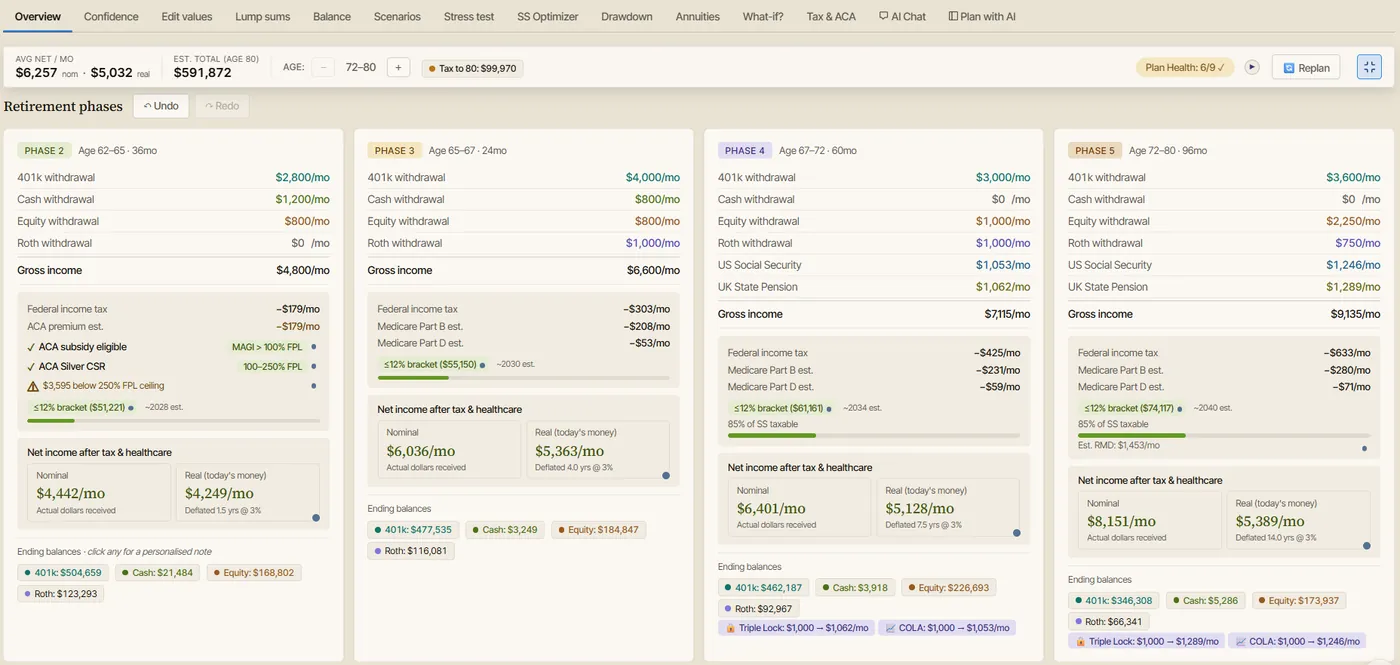
What It Models
The planner includes:
- Month-by-month retirement income projection.
- Five primary retirement phases.
- Cash, taxable equity, Roth, and tax-deferred accounts.
- Social Security and spouse Social Security.
- Couple Social Security strategy search.
- Pension income.
- Rental or passive income.
- Part-time income.
- Lump-sum inflows and outflows.
- Roth conversions.
- RMD estimates.
- US federal tax assumptions.
- Social Security taxation.
- NIIT.
- Optional state tax.
- ACA premium and FPL threshold modeling.
- Medicare Part B and Part D base premiums.
- IRMAA threshold and two-year lookback behavior.
- Healthcare inflation.
- Multi-currency and foreign-residence assumptions.
- Plan Health checks.
- Plan Confidence score.
- Monte Carlo simulation.
- Historical backtesting.
- Stress tests.
- Drawdown strategies.
- What-if tools.
- Report preview.
That matters because privacy alone is not enough.
A private retirement tool still needs to model the real retirement decisions.
For example, Monte Carlo and historical backtesting look at retirement risk from two different angles.
Privacy Tradeoffs To Understand
Local Storage Is Private, But Backups Matter
Browser localStorage can keep the plan on the user's device, but it is not the same thing as a managed cloud backup.
Users should export JSON backups and store them somewhere they trust.
Manual Entry Is More Private, But Less Automatic
No bank connection means fewer data-sharing concerns.
It also means the user must type or update balances manually.
Optional AI Can Be Helpful, But It Changes The Data Flow
The planner includes optional AI features, but they are not required for the core planner.
When optional AI/API features, model discovery, tax-rate lookup, help-content audit, exchange-rate fetching, or linked videos are used, network access can occur.
Privacy-focused users can leave optional AI features off or decide case by case.
A Local File Still Needs Device Security
Private software does not protect against every risk.
Users should still think about:
- Device passwords.
- Browser profile access.
- Disk encryption.
- Backups.
- Malware protection.
- Where exported JSON or PDF files are stored.
- Who else uses the computer.
How Cloud Planners Differ
Cloud retirement planners can be convenient.
They may offer:
- Account login.
- Cloud saving.
- Multi-device access.
- Hosted updates.
- Support teams.
- Advisor sharing.
- Integrations.
- AI assistants.
- Guided onboarding.
Those features can be valuable.
The privacy model is different because the user usually creates an account and stores information with the vendor.
That does not mean the tool is unsafe. It means the user should read:
- Privacy policy.
- Terms of service.
- Data retention rules.
- Export options.
- Account deletion rules.
- AI feature terms.
- Analytics and advertising disclosures.
- Third-party service provider disclosures.
For example, Boldin's privacy policy describes personal information collection, Google authentication data, AI-powered features, vendor/service-provider sharing, and other disclosures. A privacy-focused buyer should read those terms directly before entering plan data.
Private Does Not Mean Feature-Poor
Some users assume privacy means using only a spreadsheet or basic calculator.
That is no longer the only option.
A purpose-built planner can stay private and still model taxes, healthcare, and risk, which is the core of the retirement spreadsheet vs retirement planning software comparison.
A private retirement planner can still include:
- Taxes.
- Healthcare.
- Social Security.
- Spouse modeling.
- Survivor planning.
- Roth conversions.
- RMDs.
- ACA planning.
- Medicare and IRMAA.
- Healthcare inflation.
- Scenario comparison.
- Stress testing.
- Monte Carlo.
- Historical backtesting.
- Drawdown strategies.
- Reports.
The AI Retirement Income Planner includes those planning surfaces while keeping the core file local and account-free.
Privacy Checklist Before Choosing Retirement Software
Ask these questions before using any retirement planning tool:
- Does it require an account?
- Does it require a bank or brokerage connection?
- Can I enter data manually?
- Where is my plan stored?
- Can I export the plan?
- Can I delete the plan?
- What happens if I stop paying?
- Does the tool use analytics or tracking?
- Does the tool share data with service providers?
- Does the tool use AI features?
- Can AI features be turned off?
- Does AI use my plan data?
- Are reports stored locally or in the cloud?
- Can another person access the plan?
- Does the tool explain its privacy model in plain language?
The more sensitive the plan, the more these questions matter.
Feature Checklist For Private Retirement Planning Software
Privacy is one dimension.
Planning quality is the other.
Look for:
Income Planning
- Phase-based income.
- Monthly or annual projections.
- Spending by phase.
- Pension income.
- Rental or passive income.
- Part-time work.
- Annuity income.
Account Modeling
- Cash.
- Taxable brokerage.
- Tax-deferred accounts.
- Roth accounts.
- Account depletion order.
- Lump sums.
- Replan from current age.
Tax Planning
- Federal tax assumptions.
- Filing status.
- Social Security taxation.
- RMD estimates.
- Roth conversions.
- NIIT.
- State tax assumptions.
Healthcare Planning
- ACA before Medicare.
- Medicare Part B and Part D.
- IRMAA.
- Healthcare inflation.
- Foreign healthcare assumptions when relevant.
Risk Planning
- Plan Health checks.
- Confidence score.
- Monte Carlo.
- Historical backtesting.
- Stress tests.
- Drawdown strategy comparison.
- Scenario comparison.
- What-if tools.
Reporting And Backup
- Print or save report.
- Notes.
- Export/import.
- Saved scenarios.
- Backup instructions.
Buyer Scenarios
Privacy-First DIY Planner
Best fit:
- Local browser planner.
- Local spreadsheet.
- Manual backups.
Why:
The user values control and does not want to enter retirement data into a cloud account.
User Who Wants Automatic Balances
Best fit:
- Bank-connected app or cloud planner with integrations.
Why:
The user values convenience more than minimum data sharing.
Couple With Complex Retirement Decisions
Best fit:
- Purpose-built retirement planner with spouse, survivor, tax, healthcare, and Social Security features.
Why:
A basic calculator or simple spreadsheet may miss household-level interactions. A dedicated retirement calculator with taxes and healthcare is built to catch them.
Early Retiree Before Medicare
Best fit:
- Planner with ACA, income, taxes, withdrawals, Social Security timing, and healthcare inflation.
Why:
Pre-Medicare healthcare can interact with taxable income and withdrawal strategy.
User Who Wants AI Help
Best fit:
- Tool with clear optional AI controls and user approval.
Why:
AI can help explain scenarios, but users should understand what data is sent and when.
The AI Retirement Income Planner's AI surfaces are optional and user-configured. The audited planner includes AI Chat and a Plan with AI sidebar, with user-supplied keys and selectable storage modes.
Common Mistakes
Mistake 1: Assuming Cloud Means Unsafe
Cloud tools can have strong security practices. The user still needs to understand the vendor's privacy policy and account model.
Mistake 2: Assuming Local Means Risk-Free
Local files still depend on device security, backups, browser storage, and user habits.
Mistake 3: Ignoring Optional AI Data Flow
Optional AI can change where data goes. Treat AI as its own privacy decision.
Mistake 4: Choosing Privacy But Losing Planning Quality
A private calculator that misses taxes, healthcare, Social Security, and withdrawals may create false confidence.
Mistake 5: Connecting Accounts Without Reading Terms
Bank links and integrations can be convenient. Users should understand who receives data and what permissions are granted.
Mistake 6: Forgetting Export
If a tool does not let you export or print results, leaving later may be harder.
Where The AI Retirement Income Planner Fits
The planner is strongest for users who want:
- Private browser-based planning.
- One-time purchase.
- No account requirement.
- No bank connection.
- Manual data entry.
- Export/import.
- Taxes and healthcare in the plan.
- Social Security timing.
- Couples and survivor planning.
- Roth conversion testing.
- RMD estimates.
- Stress tests.
- Monte Carlo.
- Historical backtesting.
- Drawdown strategy comparison.
- Optional AI help.
It is less ideal for users who want:
- Automatic account aggregation.
- Daily expense tracking.
- Cloud sync.
- Advisor-managed workflow.
- Brokerage trading.
- Mobile-first budgeting.
That makes the positioning clear.
It is a private retirement income planner, not a financial account dashboard.
Educational Disclaimer
This article is educational only. It is not financial, tax, investment, legal, insurance, healthcare, privacy, cybersecurity, Social Security, estate, or retirement advice. Privacy and security depend on product design, vendor policies, device security, user behavior, and current law. Verify current terms before using any retirement planning software.
FAQ
What is private retirement planning software?
Private retirement planning software is a planning tool designed to limit unnecessary data sharing, clarify where plan data is stored, and give users more control over account requirements, bank links, exports, and optional AI features.
Is local retirement planning software more private than cloud software?
It can be, especially if it does not require an account or bank connection. But local software still depends on device security, backups, and how optional online features are used.
Does the AI Retirement Income Planner require an account?
No. The downloaded planner runs in a modern browser and does not require an account for the core planning file.
Does the planner require bank or brokerage links?
No. It is not a bank or brokerage aggregator. Users enter assumptions manually.
Where does the planner store data?
The audited planner stores plan data in browser localStorage. Users can export and import JSON files for backup and transfer.
Can optional AI reduce privacy?
Optional AI changes the data flow because AI/API features can make network calls when the user chooses to use them. Users who want a more private workflow can leave optional AI features off.
Is a spreadsheet the most private option?
A local spreadsheet can be very private if stored and backed up carefully. It may require more formula work and may not include purpose-built retirement logic.
What should privacy-focused buyers compare?
Compare account requirements, bank-link requirements, storage location, export options, deletion options, AI data flow, analytics, third-party providers, subscription terms, and planning depth.
Source Links
- AI Retirement Income Planner official site: https://airetirementincomeplanner.com/
- WebNomad product overview: https://webnomad.webflow.io/pages/ai-ready-retirement-income-planner
- FTC Privacy and Security business guidance: https://www.ftc.gov/business-guidance/privacy-security
- Boldin privacy policy: https://www.boldin.com/retirement/privacy-policy/
- ProjectionLab pricing: https://projectionlab.com/pricing
- MaxiFi pricing: https://www.maxifi.com/pricing